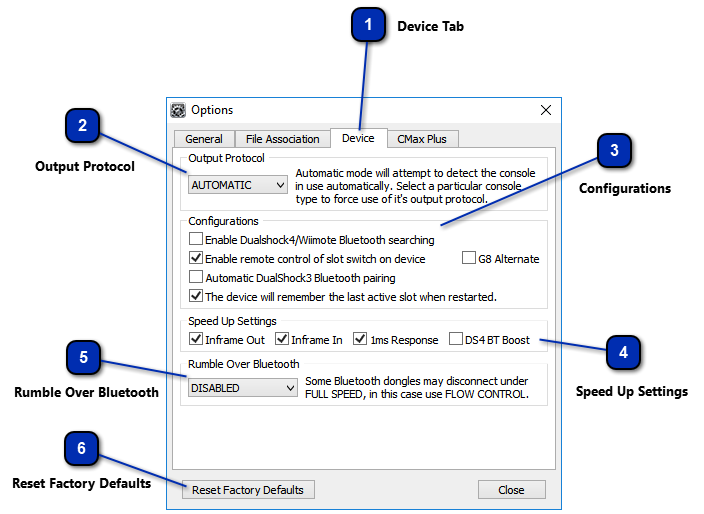
Device Tab
The Device tab within the Cronus PRO options dialog gives you access to the Output Protocol, Configuration, Speed Up and Rumble over Bluetooth Settings
|
 Output Protocol
The CronusMAX PLUS supports all four console major output protocols: PS3, XB360, PS4 and XB1. Use the drop down menu to select the corresponding protocol to the console system you are using. The AUTOMATIC output setting is essential for those that are using a USB Hub. WARNING
Unless you are using a USB Hub, If the output protocol does not match the console system in use, the CronusMAX PLUS will not work correctly.
|
 Configurations
|
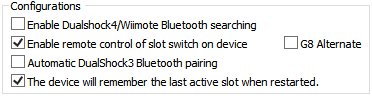
Enable DualShock4/Wiimote Bluetooth searching
|
If you want to speed up the DS4/DS3/SixAxis wireless syncing (if the controller has already been paired), this option can be disabled. This option is disabled by default.
|
|
Enable remote control of slot switch on device
|
Operate the CronusMAX PLUS memory slot switch remotely using your controller. This option is enabled by default.
|
|
G8 Alternate
|
Control the CronusMAX PLUS memory slot switch remotely using an alternative button combination for G8 layouts. This option is disabled by default.
|
|
Automatic DualShock3 Bluetooth Pairing
|
This option automatic pairs a DualShock 3 controller with the CronusMAX PLUS. If you want to use your DualShock 3 controller in wired mode only, disable this option. This option is disabled by default.
|
|
Slot Recall
|
The CronusMAX PLUS will remember the last active memory slot when restarted. This option is enabled by default.
|
|
 Speed Up Settings
These settings are very important. If they are not set correctly, you may experience a small amount of lag on newer consoles (max 4ms). They must be programmed at least once as they are all disabled on a brand new CronusMAX PLUS.

|
Inframe Out
|
Check if there is more data to send to the console within current USB frame. This setting helps improve performance and reduce input lag. This option is enabled by default.
|
|
Inframe In
|
Check if there is more data to receive from the controller within the current USB frame. This setting may improve performance and reduce input lag in some cases. This option is enabled by default. (Note: Disable this option if your firmware is 1.24+ or if you are using Tournament Mode.).
|
|
1ms Response
|
A response time of one millisecond is the fastest response time possible for USB devices. This option is enabled by default.
|
|
DS4 BT Boost
|
This setting sends multiple endpoint requests within the same USB frame. This setting improves the data acquired from DualShock 4 controllers over a Bluetooth connection. This option is disabled by default.
|
|
 Rumble Over Bluetooth
This should only be used if you are using a bluetooth adapter, otherwise set it to Disabled. This option is disabled by default.
|
FULL SPEED
|
Requires a high performance, high bandwidth 4.0 Bluetooth adapter. Try this option first.
|
|
FLOW CONTROL+
|
If you are having performance issues with FULL SPEED, try this option.
|
|
FLOW CONTROL
|
If you are having performance issues with FLOW CONTROL+, try this option.
|
|
DISABLED
|
If you are having performance issues with FLOW CONTROL try this option.
|
|
 Reset Factory Defaults
Resets all factory default settings in the Device and CMax Plus tabs.
|
|