Introduction
|
|
|
Compatible CronusMAX Firmware: 1.24+
Compatible Controllers: Dualshock 4, Dualshock 3, Xbox One, Xbox 360, Wii U Pro
Compatible Systems: PlayStation 4, Xbox One, and Microsoft Windows
The Far Cry 4 GamePack has many unique features, including Mods customized specifically for vehicles, such as Vehicle Rapid Fire and Vehicle Burst Fire. There's also Anti-Recoil, Adjustable Primary Weapon Rapid Fire, Primary Weapon Burst Fire, Auto Sprint, Auto Grapple Climb, Auto Hold Breath and options for all available button layouts.
We also invite you to join the Cronus Discord Channel - setup and run by members of the Cronus Community. There are several channels dedicated to GamePacks which offer live support and feedback, including direct support from senior members of the Cronus Community. Use this link to join our server: https://discord.gg/mJgQyM4
|
|
|
GamePack GCI Options
|
|
|
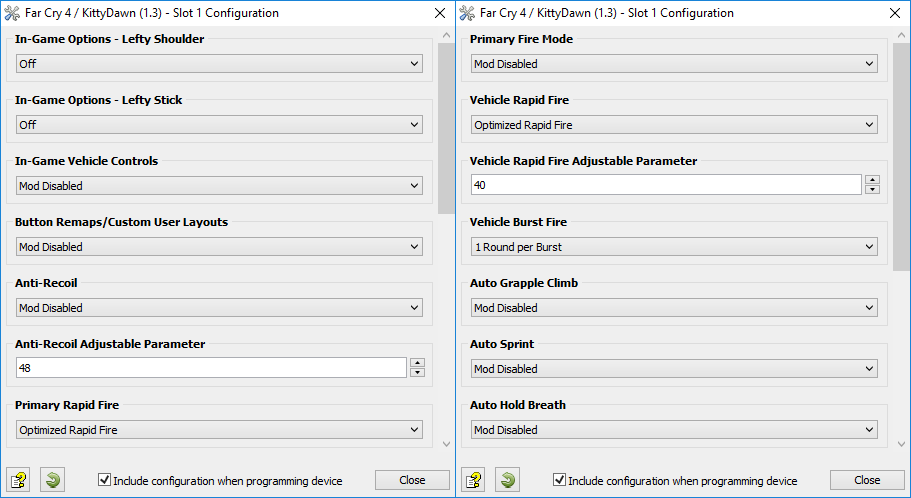
All GamePacks have Mods that can be tuned and customized to your preference. This scripting engine is what makes the CronusMAX so powerful and extremely popular with the gaming community. Gaming Mod configuration is now made more accessible than ever before with the new GCI (GamePack Configuration Interface). It pops up as soon as you program the GamePack to your Cronus ( Video). Some Mods can be directly enabled/disabled here, and some are disabled in-game by default, but have several available options that can be set here and then enabled or activated while in-game.
|
|
|
GamePack Setup
|
|
|
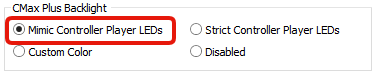
If you have a CronusMAX PLUS, open the Cronus PRO software and go to Tools > Options > CMax Plus and enable "Mimic Controller Player LEDs" for the backlight LED features to work.
|
|
|
|
|
|
Class 1
In-Game Options - Lefty Shoulder
|
If you have this option enabled in game, let the GamePack know and it will automatically adjust the necessary buttons!
NOTE: This step is very important. If you don't select the correct layout that you are using in game, the Mods in this GamePack will not work correctly.
|
|
|
|
Class 2
In Game Options - Lefty Stick
|
If you have this option enabled in game, let the GamePack know and it will automatically adjust the necessary buttons!
NOTE: This step is very important. If you don't select the correct layout that you are using in game, the Mods in this GamePack will not work correctly.
|
|
|
|
Class 3
In-Game Vehicle Controls
|
In Far Cry 4, you can only use a sidearm while driving/flying so you probably want to use different settings to your primary weapons. This Mod makes it quick and easy to switch Rapid Fire settings. If you prefer to use the Classic vehicle controls, your fire button will be one of the bumper buttons and Rapid Fire will make it difficult to drive. This Mod will also change the Rapid Fire button.
NOTE: This step is very important. If you don't select the correct layout that you are using in game, the Mods in this GamePack will not work correctly.
If you are using normal controls, Auto Sprint or Auto Hold Breath will make driving really difficult as they will constantly activate and deactivate Auto Drive. Also, Anti-Recoil isn't required while driving. This Mod will automatically disables Auto Sprint, Anti-Recoil and Auto Hold Breath.
EXTRA INFORMATION
If enabled, simply hold the X/Square button when entering/exiting a vehicle. The mod will vibrate the controller once to let you know it has been enabled and twice to let you know it has been disabled.
|
Mod
|
Name
|
Description
|
|
|
Mod Disabled
|
Enable/Disable Shortcut: Quick Press Select/Back/View/Share + Y/TRIANGLE
|
|
|
Normal Controls
|
Trigger shoots weapon.
|
|
|
Classic Controls
|
Bumper shoots weapon.
| |
|
|
|
Class 4
Button Remaps/Custom User Layouts
|
Flip Bumpers to Triggers with this popular feature, and other custom layouts.
|
Mod
|
Name
|
Description
|
|
|
Mod Disabled
|
|
|
|
Bumper/Trigger Swap
|
Swaps the Trigger & Bumper buttons.
|
|
|
wvnative's layout
|
This Mod swaps the Circle/B button with RS/R3. Special request by CronusMAX community member, wvnative
| |
This Mod compensates for vertical recoil while firing a weapon by automatically moving the control stick in the opposite direction of the one your gun is moving while firing. The adjustable parameter sets how much the compensation should be.
Remember, there isn't a one-size-fits-all setup for Anti-Recoil sensitivity due to different weapons having different perks and attachments affecting weight distribution. We suggest you try different adjustable values with each weapon and set to whatever you feel works best for you. We would appreciate if you share these values with the CronusMAX Support Community to help others :)
TIP
If your weapon is moving UP when you fire, you need a LARGER number in the adjustable parameter.
If your weapon is moving DOWN when you fire, you need a SMALLER number in the adjustable parameter.
|
Mod
|
Name
|
Description
|
|
|
Mod Disabled
|
|
|
|
Anti-Recoil
|
Anti-Recoil is activated while firing.
|
|
|
Anti-Recoil
Scope (ADS) Enable
|
Anti-Recoil is activated while firing and scoping (ADS).
|
|
|
Anti-Recoil
Scope (ADS) Disable
|
Anti-Recoil is activated while firing and NOT scoping (ADS).
|
|
|
Inverted-Y Anti-Recoil
|
Anti-Recoil with inverted Y-Axis is activated while firing.
|
|
|
Inverted-Y Anti-Recoil
Scope (ADS) Enable
|
Anti-Recoil with inverted Y-Axis is activated while firing and scoping (ADS).
|
|
|
Inverted-Y Anti-Recoil
Scope (ADS) Disable
|
Anti-Recoil with inverted Y-Axis is activated while firing and NOT scoping (ADS).
| |
|
|
|
Class 6
Primary Rapid Fire
|
When Rapid Fire is enabled, you can turn virtually any semi automatic weapon into a fully automatic weapon. This creates a very unique advantage for players using semi automatic weapons. While Rapid Fire will not usually make a fully automatic gun shoot any faster, it can have positive side effects on fully automatic guns such as reducing recoil, helping players conserve ammunition and achieve more headshots.
Mod Shortcut: While active, hold back/select and press X/Square to Enable/Disable Rapid Fire.
|
Mod
|
Name
|
Description
|
|
|
Optimized Rapid Fire
|
This Rapid Fire is optimized to be as fast as possible but at the same time ensures that every single shot is correctly registered by the game.
|
|
|
Adjustable Rapid Fire
Adjustable
|
With adjustable Rapid Fire you can always get the optimum firepower for your favorite weapon. See the menu system instructions above for more information on how to adjust your Rapid Fire speed in this mode.
|
|
|
Burst Rapid Fire
Adjustable
|
This Mod enables Burst Fire mode, turning your automatic or single shot weapons into a Burst Fire weapon. See Class 2 for adjustable values.
| |
|
|
|
Class 7
Primary Burst Fire
|
Burst firing is designed to turn semi automatic and automatic weapons into burst firing weapons. When this feature is enabled in Class 1, your weapon will fire in bursts and can be set to 1, 2, 3, 4, 5, or 6 round bursts. Burst firing can help reduce recoil and conserve ammunition.
|
Mod
|
Name
|
|
|
1 Round per Burst
|
|
|
2 Rounds per Burst
|
|
|
3 Rounds per Burst
|
|
|
4 Rounds per Burst
|
|
|
5 Rounds per Burst
|
|
|
6 Rounds per Burst
| |
|
|
|
Class 8
Primary Fire Mode
|
In this class, you can choose how the Rapid Fire & Burst Fire Mods operate. You can set them to become active as soon as you press the trigger, until you press the trigger all the way or dependant on ADS status
|
Mod
|
Name
|
Description
|
|
|
Mod Disabled
|
|
|
|
Always On
|
Rapid fire is active whenever the trigger is pressed
|
|
|
Scope Enable
|
The scope (ADS) enables Rapid Fire and Burst Fire.
|
|
|
Scope Disable
|
The scope (ADS) disables Rapid Fire and Bust Fire.
|
|
|
Press Sensitive
|
Rapid Fire and Burst Fire will only be activated by fully pressing the fire button.
| |
|
|
|
Class 9
Vehicle Rapid Fire
|
When Rapid Fire is enabled, you can turn virtually any semi automatic weapon into a fully automatic weapon. This creates a very unique advantage for players using semi automatic weapons. While Rapid Fire will not usually make a fully automatic gun shoot any faster, it can have positive side effects on fully automatic weapons such as reducing recoil, helping players conserve ammunition and achieve more headshots.
Mod Shortcut: While active, hold back/select and press Y/Triangle to Enable/Disable Vehicle Mode Rapid Fire.
|
Mod
|
Name
|
Description
|
|
|
Optimized Rapid Fire
|
This Rapid Fire is optimized to be as fast as possible but at the same time ensures that every single shot is correctly registered by the game.
|
|
|
Adjustable Rapid Fire
Adjustable
|
With Adjustable Rapid Fire you can always get the optimum firepower for your favorite weapon. See the menu system instructions above for more information on how to adjust your Rapid Fire speed in this mode.
|
|
|
Burst Rapid Fire
Adjustable
|
This Mod enables Burst Fire mode, turning your automatic or single shot weapons into a Burst Fire weapon. See Class 7 for adjustable values.
| |
|
|
|
Class 10
Vehicle Burst Fire
|
Burst firing is designed to turn semi automatic and automatic weapons into burst firing weapons. When this feature is enabled in Class 6, your weapon will fire in bursts and can be set to 1, 2, 3, 4, 5, or 6 round bursts. Burst firing can help reduce recoil and conserve ammunition. Combining Burst Fire with Adjustable Rapid Fire will give you automatic Burst Fire. This will allow you to select how many rounds are fired per burst and the amount of time between bursts for a truly customizable experience.
|
Mod
|
Name
|
|
|
1 Round per Burst
|
|
|
2 Rounds per Burst
|
|
|
3 Rounds per Burst
|
|
|
4 Rounds per Burst
|
|
|
5 Rounds per Burst
|
|
|
6 Rounds per Burst
| |
|
|
|
Class 11
Auto Grapple Climb
|
Bored of having to hold the trigger to climb up long grapples or finding that Rapid Fire makes climbing difficult and the jerky motion makes you feel sick? If so, this Mod solves your issues by automating the task.
While climbing up, press UP on the D-Pad to activate this Mod. You can then let go of the controller and your character will continue to climb. If you have vibration enabled in game, the Mod will even automatically turn off when you reach the top! If not, simply press your ADS button to disable it!
|
Mod
|
Name
|
|
|
Mod Disabled
|
|
|
Mod Enabled
| |
This Mod makes sprinting easy by automating the task of pressing the sprint button. You can set it to either sprint as soon as you move forward or not until you move the stick all the way.
|
Mod
|
Name
|
Description
|
|
|
Mod Disabled
|
Enable/Disable Shortcut: Quick Press Select/Back/View/Share + RS/R3
|
|
|
Always On
|
Your character will sprint at the same time you begin to move him forward.
|
|
|
Press Sensitive
|
Your character will sprint if the analog stick is FULLY pressed forward. The character will walk regular speed if the analog stick is only slightly pressed forward.
| |
|
|
|
Class 13
Auto Hold Breath
| When using a sniper rifle and looking down the sights, you can hold your breath to steady the aim. This Mod makes that simple by automating the task by doing it for you
|
Mod
|
Name
|
|
|
Mod Disabled
|
|
|
Mod Enabled
| |
Automatic PS4 Crossover
|
|
|
When this GamePack is being used on a PlayStation 4 and detects the connected controller is not a DualShock 4, it will automatically reassign Touchpad to the Select/Back/View Button and enable a toggle to the PS4 Share Screen.
|
|
|
Crossover Shortcut to DualShock 4 Touchpad:
Toggle to PlayStation 4 Share Screen:
Troubleshooting
|
|
|
If you find your GamePack isn't working correctly, the memory in the Cronus device where the settings are stored may have become corrupted. In this case, we recommend that you erase your memory slots using the Cronus Pro option in Tools > Device Cleanup > Erase Memory Slots. There will be an option to clear the memory slots in Cronus Pro. This step is not necessary, although recommended if you're not using the other slots.
If you're still having issues and want to check that your Cronus Device is functioning correctly with scripts, but you're not too sure how to test, we recommend you try out the easy to use Cronus Stress Test Script by Cronus Community senior staff member, Lex Lost.
|
|
|
Far Cry 4, and the Far Cry 4 logo are registered or unregistered trademarks of Ubisoft Entertainment in the U.S. and/or other countries.
The “PS” Family logo is a registered trademark and “PS4” is a trademark of Sony Computer Entertainment Inc.
Microsoft, Xbox One and the Xbox logos are trademarks of the Microsoft group of companies.
Other product names used herein are for identification purposes only and might be trademarks of their respective companies. We disclaim any and all rights to those marks.
|