Introduction
|
|
|
GamePack Author(s): KingMike
Compatible CronusMAX Firmware: 1.24+
Compatible Controllers: Dualshock 4, Dualshock 3, Xbox One, Xbox 360, Wii U Pro
Compatible Systems: PlayStation 3
The God of War Collection GamePack features everything you need to your destroy your enemies in the realms of Norse mythology. This pack supports almost every version of God of War title before 2018, including God of War, God of War II, God of War: Chains of Olympus, God of War III, God of War: Ghosts of Sparta and God of War: Ascension. Available Mods include Slow Motion, Auto Double Jump, Auto Stone Escape, Auto Button Tap and RT/R2 Evade. Guaranteed to improve your overall gameplay experience while giving a competitive edge.
We also invite you to join the Cronus Discord Channel - setup and run by members of the Cronus Community. There are several channels dedicated to GamePacks which offer live support and feedback, including direct support from senior members of the Cronus Community. Use this link to join our server: https://discord.gg/mJgQyM4
|
|
|
GamePack GCI Options
|
|
|
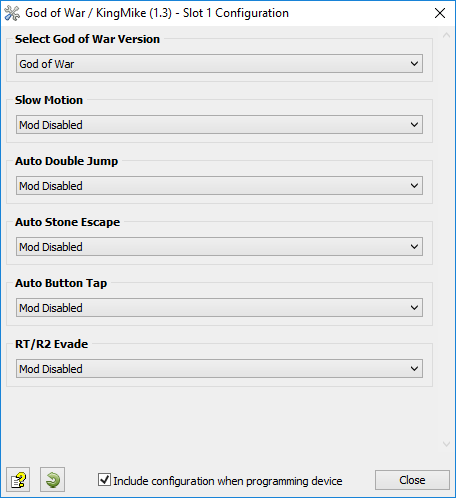
All GamePacks have Mods that can be tuned and customized to your preference. This scripting engine is what makes the CronusMAX so powerful and extremely popular with the gaming community. Gaming Mod configuration is now made more accessible than ever before with the new GCI (GamePack Configuration Interface). It pops up as soon as you program the GamePack to your Cronus ( Video). Some Mods can be directly enabled/disabled here, and some are disabled in-game by default, but have several available options that can be set here and then enabled or activated while in-game.
|
|
|
GamePack Setup
|
|
|
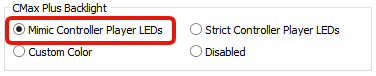
If you have a CronusMAX PLUS, open the Cronus PRO software and go to Tools > Options > CMax Plus and enable "Mimic Controller Player LEDs" for the backlight LED features to work.
|
|
|
|
|
Game Selection
Setup Step 1
|
Select which version of God of War you are playing - this step is important to ensure all Mods will work correctly.
|
#
|
Name
|
|
|
God of War
|
|
|
God of War II
|
|
|
God of War: Chains of Olympus
|
|
|
God of War III
|
|
|
God of War: Ghost of Sparta
|
|
|
God of War: Ascension
| |
Makes the game run at lower speed, allowing the player to react faster to enemies movements.
|
#
|
Name
|
Description
|
|
|
Mod Disabled
|
|
|
|
Mod Enabled
|
Press Left Analog Stick to activate / deactivate Slow Motion.
| |
Automatically performs the highest double jump just by holding the jump button (and open Icarus wings, if available).
|
#
|
Name
|
Description
|
|
|
Mod Disabled
|
|
|
|
Mod Enabled
|
Hold the jump button (A/CROSS) to perform double jump (and open Icarus wings, if available).
| |
Automatically performs the commands required to escape from petrified state (Medusa & Gargoyle) by pressing the Right Analog Stick. This Mod guarantees escape from petrification in the shortest time possible.
Select one of the following options for Auto Stone Escape in the GCI.
|
#
|
Name
|
Description
|
|
|
Mod Disabled
|
|
|
|
Mod Enabled
|
Press Right Analog Stick to activate Stone Escape.
| |
Automatically performs the actions Quick Attack, Heavy Attack, Grab / Physical Attack, Magic Attack, Heavy Combo and Quick Combo when the corresponding button is fully pressed. Pressing the button normally keep the original functionality. We recommend using a controller that has pressure sensor buttons such as the DualShock 4.
Select one of the following options for Auto Button-Tap in the GCI.
|
#
|
Name
|
Description
|
|
|
Mod Disabled
|
|
|
|
Option 1: Attack Moves
|
Includes Automatic Quick Attack, Automatic Heavy Attack, Automatic Grab / Physical Attack and Automatic Magic Attack.
|
|
|
Option 2: Combo Moves
|
Includes Automatic Quick Combo, Automatic Heavy Combo, Automatic Grab / Physical Attack and Automatic Magic Attack.
|
|
Console
|
100% Press
|
Details
|
|
|
|
Option 1: Automatic Quick Attack
Option 2: Automatic Quick Combo (Quick, Quick, Heavy)
Set the configuration option in the GCI (see below)
|
|
|
|
|
Console
|
100% Press
|
Details
|
|
|
|
Option 1: Automatic Heavy Attack
Option 2: Automatic Heavy Combo (Heavy, Heavy, Heavy)
Set the configuration option in the GCI (see below)
|
|
|
|
|
Console
|
100% Press
|
Details
|
|
|
|
Both Options: Automatic Grab / Physical Attack
|
|
|
|
|
Console
|
100% Press
|
Details
|
|
|
|
Both Options: Automatic Magic Attack
|
|
|
| |
This Mod allows you to perform the Evade action with the RT/R2 button, indicating the direction of rolling through the left analog stick.
|
#
|
Name
|
Description
|
|
|
Mod Disabled
|
|
|
|
Mod Enabled
|
Press RT/R2 to perform the evading movement towards the direction pointed by the left analog stick. Default function of RT/R2 can be performed using the toggle LB/L1 + RT/R2.
| |
Troubleshooting
|
|
|
If you find your GamePack isn't working correctly, the memory in the Cronus device where the settings are stored may have become corrupted. In this case, we recommend that you erase your memory slots using the Cronus Pro option in Tools > Device Cleanup > Erase Memory Slots. There will be an option to clear the memory slots in Cronus Pro. This step is not necessary, although recommended if you're not using the other slots.
If you're still having issues and want to check that your Cronus Device is functioning correctly with scripts, but you're not too sure how to test, we recommend you try out the easy to use Cronus Stress Test Script by Cronus Community senior staff member, Lex Lost.
|
|
|
God of War is a trademark of Sony Interactive Entertainment LLC.
The “PS” Family logo is a registered trademark and “PS4” is a trademark of Sony Computer Entertainment Inc.
Microsoft, Xbox One and the Xbox logos are trademarks of the Microsoft group of companies.
Other product names used herein are for identification purposes only and might be trademarks of their respective companies. We disclaim any and all rights to those marks.
|