Halo Master Chief Collection - Halo 2 Classic Alternative 2
Introduction
|
|
|
GamePack Author(s): KittyDawn
Compatible CronusMAX Firmware: 1.24+
Compatible Controllers: Dualshock 4, Dualshock 3, Xbox One, Xbox 360, Wii U Pro
Compatible Systems: Xbox One and Microsoft Windows
The Halo Master Chief Collection - Halo 2 Classic Alternative 2 GamePack includes an Advanced Rapid Fire system that features the awesome Battle Rifle Double Shot 2.0 and Battle Rifle Quad Shot 2.0 Glitch Mods, as well as custom mapping of Secondary Melee Mods such as Double Melee and Melee Shot, topping it all off with a Quicker Reload Mod. You will do the UNSC Naval Special Warfare Command proud with this set of Mods in your arsenal.
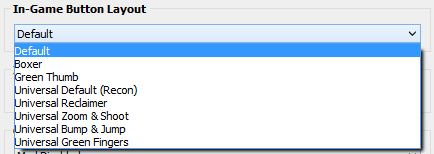
All the different default button layouts are also supported, including Boxer, Green Thumb, Universal Default (Recon), Universal Reclaimer, Universal Zoom & Shoot, Universal Bump & Jump and Universal Green Fingers - as well as both Thumbstick layouts.
We also invite you to join the Cronus Discord Channel - setup and run by members of the Cronus Community. There are several channels dedicated to GamePacks which offer live support and feedback, including direct support from senior members of the Cronus Community. Use this link to join our server: https://discord.gg/mJgQyM4
|
|
|
GamePack GCI Options
|
|
|
All GamePacks have Mods that can be tuned and customized to your preference. This scripting engine is what makes the CronusMAX so powerful and extremely popular with the gaming community. Gaming Mod configuration is now made more accessible than ever before with the new GCI (GamePack Configuration Interface). It pops up as soon as you program the GamePack to your Cronus ( Video). Some Mods can be directly enabled/disabled here, and some are disabled in-game by default, but have several available options that can be set here and then enabled or activated while in-game.
|
|
|
GamePack Setup
|
|
|
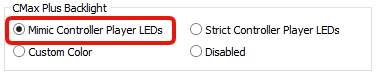
If you have a CronusMAX PLUS, open the Cronus PRO software and go to Tools > Options > CMax Plus and enable "Mimic Controller Player LEDs" for the backlight LED features to work.
|
|
|
|
|
In-Game Button Layout
Setup Step 1
|
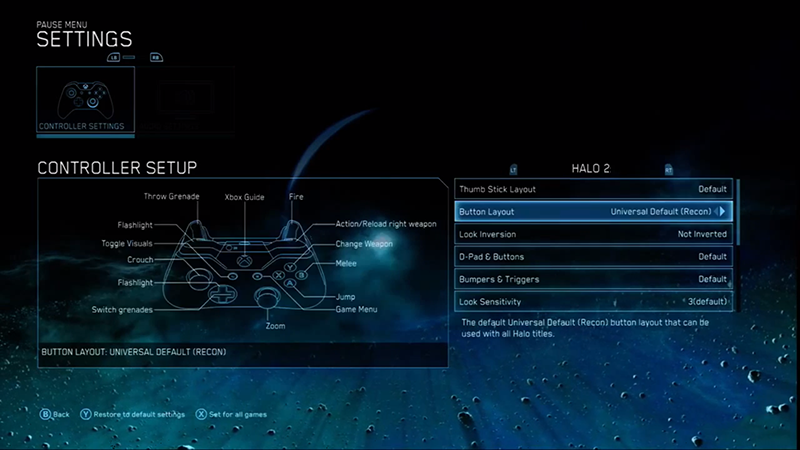
All default Halo MCC button layout options are available in this GamePack. Use the GCI (see below) to select the one you are using, and the GamePack will automatically adjust all the Mods to your preferred choice.
MENU/OPTIONS BUTTON> SETTINGS > CONTROLLER SETUP > BUTTON LAYOUT
NOTE: This step is critical. If you don't select the correct button layout that you are using in-game, the Mods will not function correctly, especially Anti-Recoil. Use these game provided layouts for optimal GamePack performance.
|
Option
|
Name
|
|
|
Default
|
|
|
Boxer
|
|
|
Green Thumb
|
|
|
Universal Default (Recon)
|
|
|
Universal Reclaimer
|
|
|
Universal Zoom & Shoot
|
|
|
Universal Bump & Jump
|
|
|
Universal Green Fingers
|
|
|
|
Community Custom Layouts
Setup Step 3
|
|
Option
|
Name
|
Notes
|
|
|
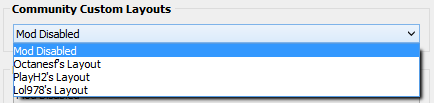
Octanesf's Layout
|
This custom layout swaps LT/L2 with LB/L1 and RB/R1 with B/CIRCLE.
|
|
|
PlayH2's Layout
|
This custom layout swaps LB/L1 with A/CROSS.
|
|
|
Lol978's Layout
|
This custom layout swaps the LT/L2 with RB/R1.
|
|
|
|
Advanced Rapid Fire
Mod 1 - Speed Toggle
|
When Advanced Rapid Fire is enabled, you can turn virtually any semi-automatic weapon into a deadly, fully automatic weapon. This creates a very unique advantage for players using semi-automatic weapons and some shotguns too. Rapid Fire is not meant for fully automatic weapons, however it can have positive side effects such as reducing recoil, helping players conserve ammunition and achieve more headshots due to a slower, more controlled fire rate.
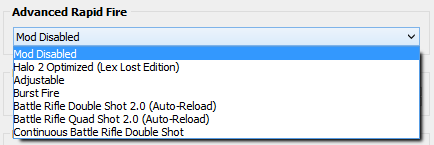
There are several options available: Halo 2 Optimized (Lex Lost Edition), Adjustable and Burst Fire, as well as the famous Battle Rifle Double Shot and Quad Shot glitches, with Auto Reload glitches too.
You can also customized how Rapid Fire is activated - see Fire Mode (Mod 3) below, and the Adjustable option allows you to enter a custom fire speed value. As always, timings depend on the type of weapon used and any add-ons or perks you may have. Adjustable Range is 20 - 500 (Default 40).
This Mod is disabled in-game by default; however, it can be enabled (or disabled) via a Speed Toggle during gameplay. Once enabled, the Mod will activate based on your GCI selection.
|
Console
|
Speed Toggle
|
|
|
|
|
|
|
|
|
|
|
|
|
|
|
|
Advanced Rapid Fire Enable/Disable
|
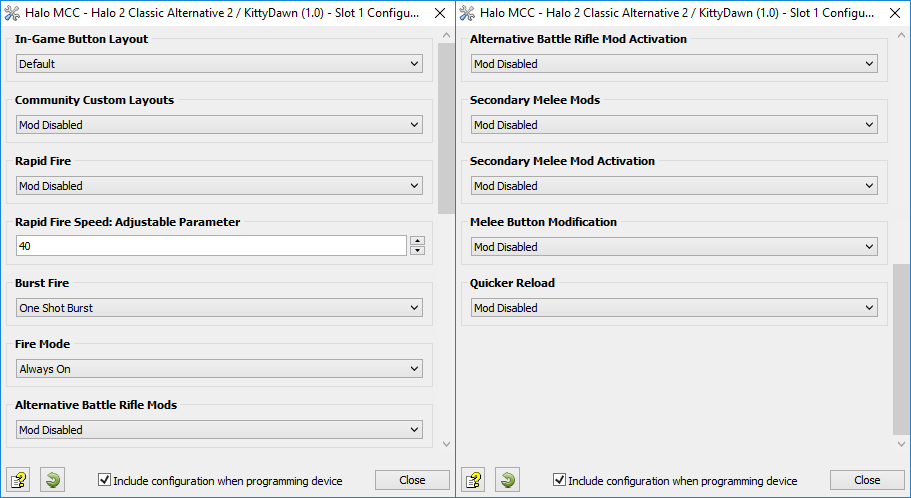
Select one of the following options for Advanced Rapid Fire in the GCI, including the adjustable fire speed (see images below). Note: This setting can only be applied in the GCI, not in-game, so whatever option you select here will always be the active choice whenever this Mod is in use.
|
Option
|
Name
|
Notes
|
|
|
Mod Disabled
|
|
|
|
Halo 2 Optimized Rapid Fire
|
This Rapid Fire mod comes to you courtesy of Lex Lost (Cronus Community Staff member). These timings not only improve almost every gun, they also eliminate recoil. Empty an entire clip of the SMG and still be looking straight ahead!
|
|
|
Adjustable
Adjustable
|
Adjustable Rapid Fire uses the custom speed you enter in the GCI (see image below).
|
|
|
Burst Fire
Adjustable (See Class 3)
|
Burst Fire can reach a faster rate of fire with burst type weapons. The weapon can be set to 1, 2, 3, 4, 5, or 6 round bursts (See Mod 2 for more details). |
|
|
Battle Rifle Double Shot 2.0
Auto Reload
|
Double Fire (or Double Shot as the community likes to call it) is a glitch in Halo 2 that allows the players to fire two consecutive bursts from a Battle Rifle. The version 2.0 of the Mod performs the double fire glitch by firing 2 bursts of 3 shots and then automatically reloads without the animation. See below for a video demonstration.
|
|
|
Battle Rifle Quad Shot 2.0
Auto Reload
Secondary Weapon Required
|
Same as Option 5 above but with 4 bursts of 3 shots.
|
|
|
Continuous Battle Rifle Double Shot
Secondary Weapon Required
|
Same as Option 5 above but will continue firing until the clip is completely empty.
|
  Double Shot Demo (Video)
|
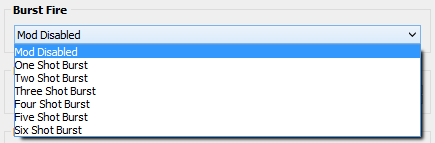
Burst fire is designed to turn semi-automatic and automatic weapons into burst firing weapons. When this feature is enabled, your weapon will fire in bursts and can be set to 1, 2, 3, 4, 5, or 6 round bursts. Burst firing can help reduce recoil and conserve ammunition.
This Mod is disabled by default; however, it can be enabled in the GCI (see image below) and the Burst Fire option must be enabled (option 4) in the Advanced Rapid Fire Mod. There is no Toggle for this option so it cannot be changed during gameplay.
|
Option
|
Name
|
|
|
Mod Disabled
|
|
|
One Shot Burst
|
|
|
Two Shot Burst
|
|
|
Three Shot Burst
|
|
|
Four Shot Burst
|
|
|
Five Shot Burst
|
|
|
Six Shot Burst
|
|
Select how Rapid/Burst Fire ( Mod 1) is Activated. You can either have Rapid Fire or Burst Fire active as soon as you press the trigger or not until it is fully pressed.
This Mod is set to Always On by default; however, it can be changed in the GCI (see image below). There is no Toggle for this option so it cannot be changed during gameplay.
|
Option
|
Name
|
Notes
|
|
|
Always On
|
Rapid/Burst Fire is activated as soon as the fire trigger is pressed.
|
|
|
Press Sensitive
|
Rapid/Burst Fire is not activated until the fire trigger is fully pressed.
|
|
|
|
Alternative Battle Rifle Mods
Mod 4 - Speed Toggle
|
If you would like to use Rapid Fire for your Magnum, but would also like to switch to your Battle Rifle and bang off a quad fire burst, pressing the D-Pad and then trigger can be a bit of a hassle. We've created this Mod so you can just use D-Pad, RB/R1 or LB/L1 to activate the Battle Rifle Double Shot 2.0 or Battle Rifle Quad Shot 2.0 Glitch Mods.
This Mod is disabled in-game by default; however, it can be enabled (or disabled) via a Speed Toggle during gameplay. Once enabled, the Mod will activate based on your GCI selection.
|
Console
|
Speed Toggle
|
|
|
|
|
|
|
|
|
|
|
|
Alt Battle Rifle Mods Enable/Disable
|
Important
|
|
|
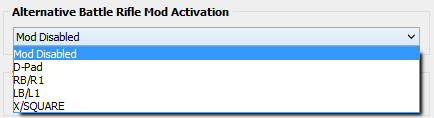
There is a different activation button based on the button layout you are using. D-Pad is the recommended default, and is used in the examples below, however you can select RB/R1, LB/L1 or X/SQUARE as the activation button in the GCI (see image below). Any remapped buttons are automatically reassigned. For example if you choose to select RB/R1 to active this mod, the right bumpers' normal action will be reassigned to the D-Pad.
Be sure not to share the same Bumpers as Secondary Melee Mods (Mod 5).
|
|
|
|
Button Layouts 1-6
|
|
Console
|
Activate Mod
|
|
|
|
|
|
|
|
|
|
|
|
Activate Alt Battle Rifle Mod
|
|
Button Layouts 7-8
|
|
Console
|
Activate Mod
|
|
|
|
|
|
|
|
|
|
|
|
Activate Alt Battle Rifle Mod
|
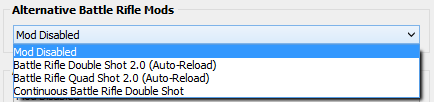
Select one of the following options in the GCI (see image below). Note: This setting can only be applied in the GCI, not in-game, so whatever option you select here will always be the active choice whenever this Mod is in use.
|
Option
|
Name
|
Notes
|
|
|
Mod Disabled
|
|
|
|
Battle Rifle Double Shot 2.0
Auto Reload
|
Double Fire (or Double Shot as the community likes to call it) is a glitch in Halo 2 that allows the players to fire two consecutive bursts from a Battle Rifle. The version 2.0 of the Mod performs the double fire glitch by firing 2 bursts of 3 shots and then automatically reloads without the animation. See above for a video demonstration. However, there is a second or two pause where you cannot shoot until the reload is complete. You can cancel that reload by switching to your secondary weapon and back to primary again (See Option 3 below).
|
|
|
Battle Rifle Quad Shot 2.0
Auto Reload
Secondary Weapon Required
|
Same as Option 2 above but with 4 bursts of 3 shots.
|
|
|
Continuous Battle Rifle Double Shot
Secondary Weapon Required
|
Same as Option 2 above but will continue firing while the activation button is being held until the clip is completely empty.
|
|
|
|
Secondary Melee Mods
Mod 5 - Speed Toggle
|
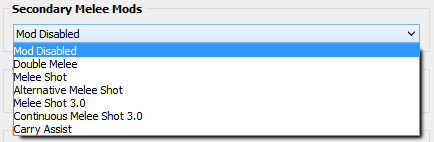
Would you like to be able to perform a Melee Shot with a single button press, while still being able to perform a standard melee when you've no ammo or aren't reloaded? No problem! We've created this Mod so you can just use D-Pad, RB/R1 or LB/L1 to activate the Double Melee, Melee Shot, Alternative Melee Shot, Melee Shot 3.0, Continuous Melee Shot 3.0 and Carry Assist.
This Mod is disabled in-game by default; however, it can be enabled (or disabled) via a Speed Toggle during gameplay. Once enabled, the Mod will activate based on your GCI selection.
|
Console
|
Speed Toggle
|
|
|
|
|
|
|
|
|
|
|
|
Anti-Recoil Enable/Disable
|
Important
|
|
|
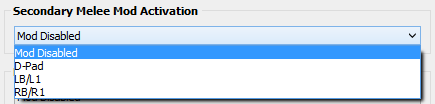
There is a different activation button based on the button layout you are using. D-Pad is the recommended default, and is used in the examples below, however you can select RB/R1 or LB/L1 as the activation button in the GCI (see image below). Any remapped buttons are automatically reassigned. For example if you choose to select LB/L1 to active this mod, the left bumpers' normal action will be reassigned to the D-Pad.
Be sure not to share the same Bumpers as Alternative Battle Rifle Mods (Mod 4).
|
|
|
|
Button Layouts 1-6
|
|
Console
|
Activate Mod
|
|
|
|
|
|
|
|
|
|
|
|
Activate Alt Battle Rifle Mod
|
|
Button Layouts 7-8
|
|
Console
|
Activate Mod
|
|
|
|
|
|
|
|
|
|
|
|
Activate Alt Battle Rifle Mod
|
Select one of the following options in the GCI (see image below). Note: This setting can only be applied in the GCI, not in-game, so whatever option you select here will always be the active choice whenever this Mod is in use.
|
Option
|
Name
|
Notes
|
|
|
Mod Disabled
|
|
|
|
Double Melee
|
Enables the Double Melee BXB combo. BXB uses the Cancel Reload glitch to enable the player to melee twice in the same amount of time it takes to melee once. This Mod is slightly slower than BXR but has the advantage of not requiring a full clip to perform.
|
|
|
Melee Shot
|
Enables the Melee Shot BXR combo (equipped gun must be fully loaded). BXR uses the Cancel Reload glitch to enable the player to melee and fire a round in the same amount of time it takes to melee once. The melee hit will deplete the opponents shields and the shot should finish them off giving you an instant kill. This Mod is quicker than BXB but does require a full clip to perform.
|
|
|
|
Melee Button Modification
Mod 6 - Speed Toggle
|
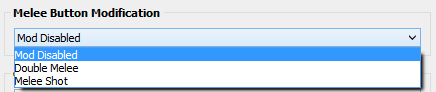
Want to use Double Melee and Melee Shot at the same time? No problem, this Mod allows you to reassign the function of the melee button to perform one of these actions when pressed.
This Mod is disabled in-game by default; however, it can be enabled (or disabled) via a Speed Toggle during gameplay. Once enabled, the Mod will activate based on your GCI selection.
|
Console
|
Speed Toggle
|
|
|
|
|
|
|
|
|
|
|
|
Anti-Recoil Enable/Disable
|
Select one of the following options in the GCI (see image below). Note: This setting can only be applied in the GCI, not in-game, so whatever option you select here will always be the active choice whenever this Mod is in use.
|
Option
|
Name
|
Notes
|
|
|
Mod Disabled
|
|
|
|
Double Melee
|
Enables the Double Melee BXB combo.
|
|
|
Melee Shot
|
Enables the Melee Shot BXR combo (equipped gun must be fully loaded).
|
|
|
|
Quicker Reload
Mod 7 - Speed Toggle
|
Automatically cancel out of the reload before the reload animation has finished with the melee button, so although the animation has not finished, your gun is already reloaded! Not only does this allow you to shoot quicker, if an opponent catches you in the middle of a reload, you'll smack them in the face without pressing a button and can finish them off with a nice headshot. This Mod has two versions, Quick Reload which cancels the melee, enabling you to shoot as quickly as possible, and Quick Reload, which waits for the melee hit to register before canceling. It takes a fraction of a second longer before you can shoot again but your melee hit will do more damage.
This Mod is disabled in-game by default; however, it can be enabled (or disabled) via a Speed Toggle during gameplay. Once enabled, the Mod will activate based on your GCI selection.
|
Console
|
Speed Toggle
|
|
|
|
|
|
|
|
|
|
|
|
|
|
|
|
Quick Reload Enable/Disable
|
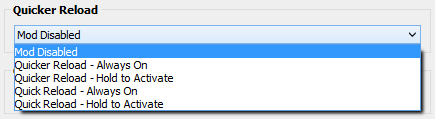
Set the following options in the GCI (see image below). Note: This setting can only be applied in the GCI, not in-game, so whatever option you select here will always be the active choice whenever this Mod is in use.
|
Option
|
Name
|
Notes
|
|
|
Mod Disabled
|
|
|
|
Quicker Reload
Always On
|
Quicker Reload will activate at any time Melee is pressed (B/CIRCLE).
|
|
|
Quicker Reload
Hold to Activate
|
Quicker Reload will activate at any time Melee is held (B/CIRCLE). Tap for normal reload.
|
|
|
Quick Reload
Always On
|
Quick Reload will activate at any time Melee is pressed (B/CIRCLE).
|
|
|
Quick Reload
Hold to Activate
|
Quick Reload will activate at any time Melee is held (B/CIRCLE). Tap for normal reload.
|
|
Utility Toggles
|
|
|
Utility toggles are designed to give you additional control of the GamePack in real-time. A simple tap of a pre-configured button combo and the toggle is instantly activated.
|
|
|
|
|
Global Killswitch
Utility 1 - Speed Toggle
|
Quickly enable or disable the entire GamePack with this convenient killswitch toggle.
|
Console
|
Speed Toggle
|
LED
|
|
|
|
|
|
|
|
|
|
|
|
|
|
|
|
|
|
|
|
|
|
|
|
|
|
|
|
|
|
|
Led: GamePack On = Pink LED
GamePack Off = Blue LED
| |
Troubleshooting
|
|
|
If you find your GamePack isn't working correctly, the memory in the Cronus device where the settings are stored may have become corrupted. In this case, we recommend that you erase your memory slots using the Cronus Pro option in Tools > Device Cleanup > Erase Memory Slots. There will be an option to clear the memory slots in Cronus Pro. This step is not necessary, although recommended if you're not using the other slots.
If you're still having issues and want to check that your Cronus Device is functioning correctly with scripts, but you're not too sure how to test, we recommend you try out the easy to use Cronus Stress Test Script by Cronus Community senior staff member, Lex Lost.
|
|
|
Important
|
|
|
When using this GamePack for the first time, be sure to check each Mod to make sure everything is enabled or disabled precisely the way you want. With the built-in Toggles this should take only a couple of minutes and will also make you familiar with how to use and configure the GamePack. We have found this eliminates almost all issues that users have.
|
|
|
Halo 2 Classic Alt 2 (MCC) GamePack - Toggle Cheat Sheet
|
|
SPEED TOGGLES
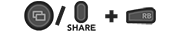
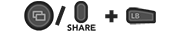
(HOLD VIEW/SHARE + BUTTON)
|
|
Advanced Rapid Fire
Alternative Battle Rifle Mods
Secondary Melee Mods
Melee Button Modification
Quicker Reload
Utilities
Global Kill Switch
|
Halo Master Chief Collection and the Halo Master Chief Collection logo are trademarks or registered trademarks of Microsoft Corporation in the US and/or other countries.
The “PS” Family logo is a registered trademark and “PS4” is a trademark of Sony Computer Entertainment Inc.
Microsoft, Xbox One and the Xbox logos are trademarks of the Microsoft group of companies.
Other product names used herein are for identification purposes only and might be trademarks of their respective companies. We disclaim any and all rights to those marks.
|