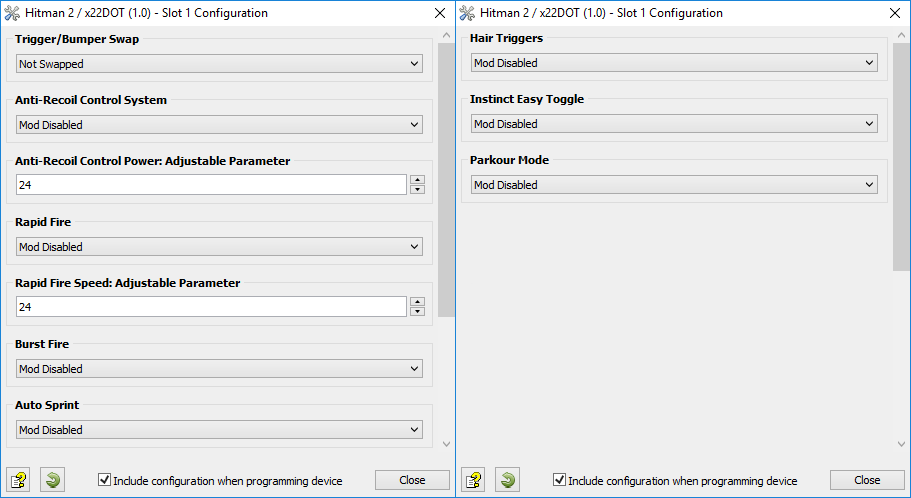
The Hitman 2 GamePack features x22DOT's popular Anti-Recoil Control System. Other options include Rapid Fire, Burst Fire, Auto Sprint, Hair Triggers, Trigger/Bumper Swap, Instinct Easy Toggle and Parkour Mode.
We also invite you to join the Cronus Discord Channel - setup and run by members of the Cronus Community. There are several channels dedicated to GamePacks which offer live support and feedback, including direct support from senior members of the Cronus Community. Here's an exclusive invite, just for Cronus users: https://discord.gg/mJgQyM4
GamePack GCI Options
All GamePacks have Mods that can be tuned and customized to your preference.
This scripting engine is what makes the CronusMAX so powerful and extremely
popular with the gaming community. Gaming Mod configuration is now made more
accessible than ever before with the new GCI (GamePack Configuration Interface).
It pops up as soon as you program the GamePack to your Cronus (Video). Some Mods can
be directly enabled/disabled here, and some are disabled in-game by default,
but have several available options that can be set here and then enabled or
activated while in-game.
GamePack Setup
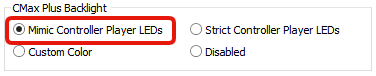
If you have a CronusMAX PLUS, open the Cronus PRO software and go to
Tools > Options > CMax Plus and enable "Mimic
Controller Player LEDs" for the backlight LED features to
work.
Automatic PS4 Crossover
When this GamePack is being used on a PlayStation 4 and detects the
connected controller is not a DualShock 4, it will automatically reassign
Touchpad to the Select/Back/View Button and enable a toggle to the PS4 Share
Screen.
Crossover
Shortcut to DualShock 4 Touchpad:
Toggle to
PlayStation 4 Share Screen:
Troubleshooting
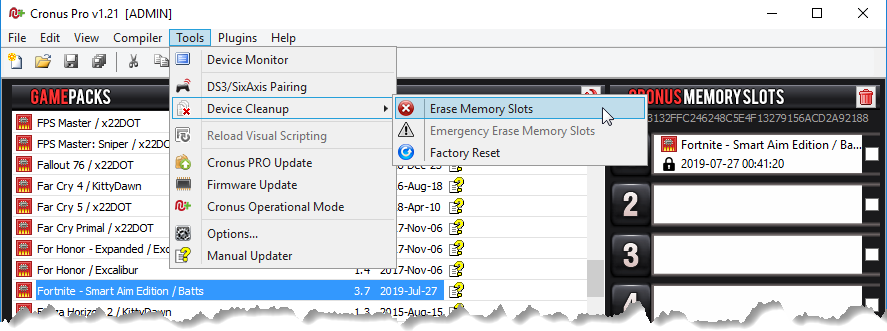
If you find your GamePack isn't working correctly, the memory in the Cronus device where the settings are stored may have become corrupted. In this case, we recommend that you erase your memory slots using the Cronus Pro option in Tools > Device Cleanup > Erase Memory Slots. There will be an option to clear the memory slots in Cronus Pro. This step is not necessary, although recommended if you're not using the other slots.
If you're still having issues and want to check that your Cronus Device is functioning correctly with scripts, but you're not too sure how to test, we recommend you try out the easy to use Cronus Stress Test Script by Cronus Community senior staff member, Lex Lost.
HITMAN 2, and HITMAN 2 logo are trademarks or registered trademarks owned by or exclusively licensed to IO Interactive A/S.
The “PS” Family logo is a registered trademark and “PS4” is a trademark of Sony Computer Entertainment Inc.
Microsoft, Xbox One and the Xbox logos are trademarks of the Microsoft group of companies.
Other product names used herein are for identification purposes only and might be trademarks of their respective companies. We disclaim any and all rights to those marks.