The
Loadout GamePack for CronusMAX PLUS has 24 distinct Mods grouped into 9 classes, including Rapid
Fire, Easy Sprint, Bunny Hop and Turbo Melee.
Instructions for Loadout GamePack
Compatible CronusMAX PLUS Firmware: 1.24+
Compatible Controllers: Dualshock 4, Dualshock 3, Xbox
One, Xbox 360, Wii U Pro
Compatible Systems: Playstation 4 and Windows
PC
IMPORTANT
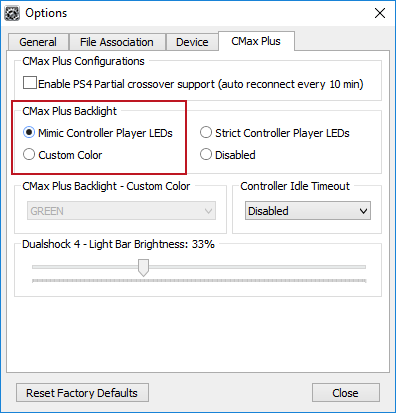
If you have a CronusMAX PLUS, make sure you goto Tools > Options >
CMax Plus and enable "Mimic Controller Player LEDs" in the CMax Plus Backlight area if you
want the CronusMAX PLUS Backlight LED features to work. Also, for more information on the
benefits of using a USB Hub with your CronusMAX PLUS Click
Here
Quick
Disable/Re-Enable GamePack:
|
|
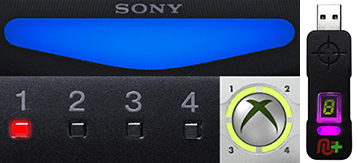
Player LED 1: Controller in regular mode, the GamePack is Disabled
(Blue on DS4 / CronusMAX PLUS
Backlight LED).
Player LED 4: The GamePack is Enabled (Pink on DS4 / CronusMAX PLUS
Backlight LED).
|
GCI
(GamePack Configuration Interface) Operation:
All
GamePacks have Mods that can be tuned and customized to your own preference. This is what makes the
CronusMAX so powerful and extremely popular with the gaming community. The settings are usually made
using the controllers built in GamePack Menu Mode, as explained below. However, there is a much
easier and quicker method via the new GCI (GamePack Configuration Interface).
NOTE
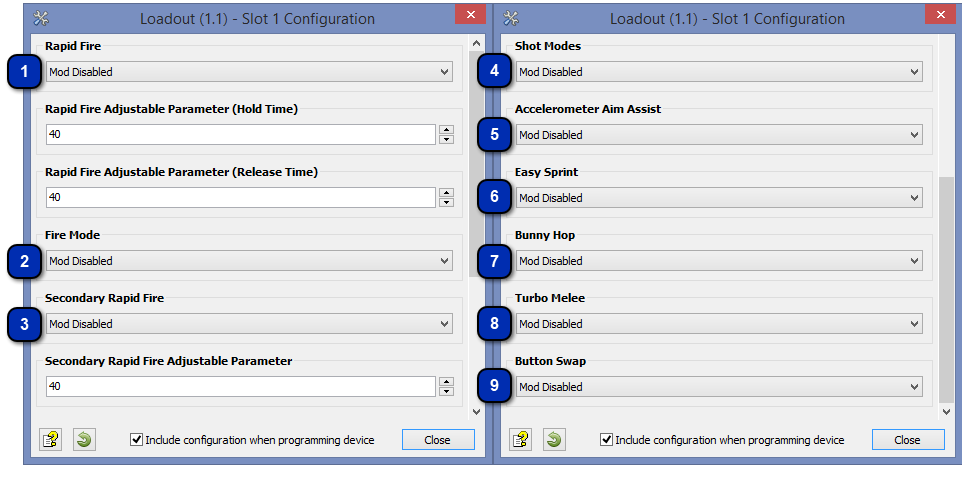
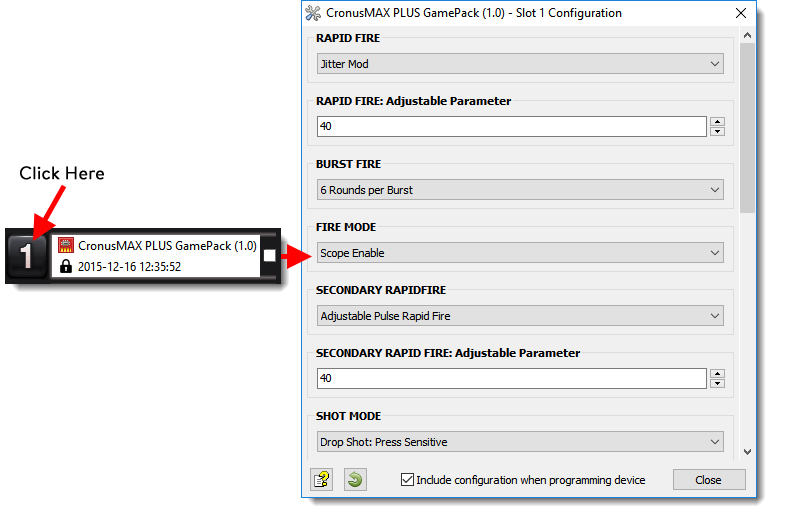
Pre-configure your GamePack settings using the GamePack Configuration Interface
(GCI) in the Cronus PRO software. The GCI opens automatically when you load a
GamePack to a memory slot, or you can simply click on the memory slot number to the left of
the loaded GamePack to open the GCI. As soon as you select your preferred settings, close
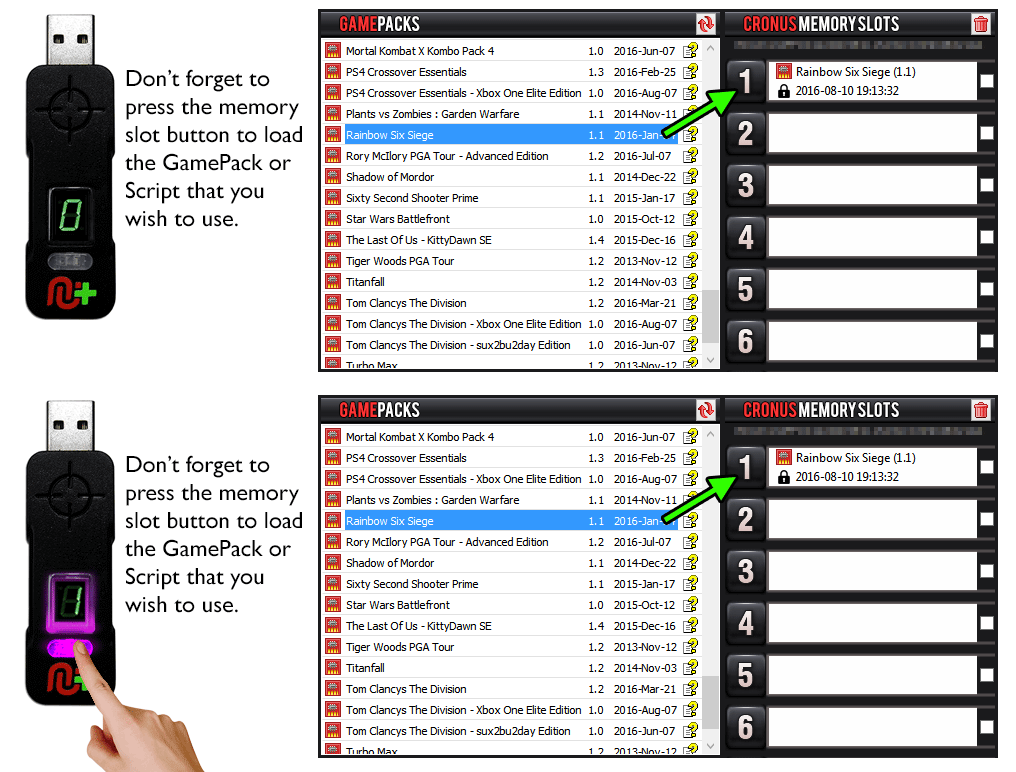
the GCI and click the PROGRAM DEVICE button. To select the GamePack you wish to use on your
console, press the Memory Slot button on the CronusMAX PLUS so that it highlights the
corresponding number on the LED (so if you have a GamePack loaded to Memory Slot 1, the LED
on the CronusMAX PLUS should display the number 1).
How
to Enter GamePack Menu Mode:
Note: The Menu is navigated via the CronusMAX PLUS LED System and also the controller's Player Number LED's if available. It is not an on-screen menu. Click Here for an instructional video.
|
|
|
|
|
Hold
SELECT+START for 2 seconds to enter menu mode.
|
|
|
|
|
|
Hold
SHARE+OPTIONS for 2 seconds to enter menu mode*
|
|
|
|
|
|
Hold
BACK+START for 2 seconds to enter menu mode.
|
|
|
|
|
|
Hold
VIEW+MENU for 2 seconds to enter menu mode.
|
IMPORTANT
Always keep the SELECT / SHARE / BACK / VIEW button pressed while in Menu
Mode. To exit Menu mode, release the SELECT / SHARE / BACK / VIEW button.
|
|
Player LED 4 will blink the number of the current
Class (DS4 / CronusMAX PLUS Backlight LED will flash Pink).
Player LED 3 will blink the number of the active
Mod for the current Class (DS4 / CronusMAX PLUS Backlight LED will flash
Green).
Note: If the Player LED 3 is not blinking, it means either no Mod
is loaded/disabled or the default setting is selected for the current Class. See
below for instructions how to navigate between Classes and Mod's.
|
To
Navigate Between Classes:
To
Navigate Between Mods Within the Current Class:
GamePack Classes and Mods
|


|
When Rapid Fire is enabled, you can turn virtually any semi automatic weapon
into a fully automatic weapon. This creates a very unique advantage for players
using semi automatic weapons in the Loadout game. While Rapid Fire will not
usually make a fully automatic gun shoot any faster, it can have positive side
effects on fully automatic guns such as reducing recoil, helping players
conserve ammunition and achieve more headshots.
HOW TO ADJUST THE RAPID FIRE SPEED
You can adjust Rapid Fire speed and test your settings
within the game. (In Menu Mode: LB/L1 Reduce Value Increases Rate of
Fire - RB/R1 Increase Value Reduces Rate of Fire - RT/R2 Test).
|
|
Increases
Rate of Fire
|
|
Decreases
Rate of Fire
|
|
Test current
Rate of Fire
|
|
Mod
|
Name
|
Description
|
|
|
Mod Disabled
|
|
|
|
Optimized Rapid Fire
|
This Rapid Fire is optimized to be as fast as possible but at
the same time ensuring that every single shot will be correctly
registered by the game.
|
|
|
Symmetric Rapid Fire Adjustable
|
With Symmetric Adjustable Rapid Fire you can always get the
optimum firepower for your favorite weapon. See the menu system
instructions above for more information on how to adjust your
Rapid Fire speed in this mode.
|
|
|
Asymmetric Rapid Fire Adjustable
|
The Asymmetric Rapid Fire you can precisely set the amount of
time the fire button should be held down and how long it should
be released. For example you can set the asymmetric Rapid Fire
to fire for 120ms and wait 90ms for the next firing loop. The
hold and release times can be adjusted using the GamePack
Configuration Interface in Cronus PRO.
|
|
|
Fire mode determines an assist action to be used together with Rapid Fire and/or
Burst Fire. These are normally applied to the triggers.
|
Mod
|
Name
|
Description
|
|
|
Mod Disabled
|
|
|
|
Zoom Disable
|
The zoom (ADS) disables Rapid Fire.
|
|
|
Zoom Enable
|
The zoom (ADS) enables Rapid Fire.
|
|
|
Press Sensitive
|
Rapid Fire will only be activated by fully pressing the fire
button.
|
|
|
|
|
|
Class 3
Secondary Rapid Fire
|
If Secondary Rapid Fire is enabled it will take place when the regular Rapid
Fire is not actuating. For example if your regular Rapid Fire is only active
when scoping then the secondary Rapid Fire will be activated when you are not
using scope. This behavior can be very handy to set a precise rate of fire while
aiming and a more aggressive rate of fire while hipfiring.
HOW TO ADJUST THE SECONDARY RAPID FIRE SPEED
You can adjust Secondary Rapid Fire speed and test
your settings within the game. (In Menu Mode: LB/L1 Reduce Value
Increases Rate of Fire - RB/R1 Increase Value Reduces Rate of Fire -
RT/R2 Test).
|
|
Increases
Rate of Fire
|
|
Decreases
Rate of Fire
|
|
Test current
Rate of Fire
|
|
Mod
|
Name
|
Description
|
|
|
Mod Disabled
|
|
|
|
Optimized Rapid Fire
|
This Secondary Rapid Fire is optimized to be as fast as possible
but at the same time ensuring that every single shot will be
correctly registered by the game.
|
|
|
Adjustable Rapid Fire Adjustable
|
With Adjustable Secondary Rapid Fire you can always get the
optimum firepower for your favorite weapon. See the menu system
instructions above for more information on how to adjust your
Rapid Fire speed in this mode.
|
|
|
Pulse Rapid Fire Adjustable
|
Pulse Secondary Rapid Fire can reach a faster rate of fire with
burst type weapons.
|
|
|
Assign an action to be performed automatically when you press the fire button.
|
Mod
|
Name
|
Description
|
|
|
Mod Disabled
|
|
|
|
Jump Shot Scope Disable
|
When you press the fire button your character will immediately
jump and begin firing. This action is not performed if the scope
(ADS) is in use.
|
|
|
Jump Shot Press Sensitive
|
Performs the same action as jump shot but is only activated when
you FULLY press the fire button.
|
|
|
Side Shot Zoom Disable
|
When you press the fire button, your character will begin to
make side movements and begin firing, confusing the enemy in the
process. This action is not performed if the zoom (ADS) is in
use.
|
|
|
Side Shot Press Sensitive
|
Performs the same action as side shot but is only activated when
you FULLY press the fire button.
|
|
|
Zoom Shot Zoom Disable
|
When you pull the fire button, your character will automatically
use the zoom (ADS). This is useful for single shot weapons,
decreasing the spread effect and increasing accuracy in combat.
This action is not performed if the zoom (ADS) is in use.
|
|
|
|
|
|
Class 5
Accelerometer Aim Assist
|
With Accelerometer Aim Assist, you can use a Six-Axis DualShock 4 or DualShock 3
controller to aim while scoping. This means you can move the controller to
adjust the target position when scoped in. This Mod will not affect aiming with
the right stick. It will only add an additional option to aim with. Each of the
modes will add sensitivity with mode 1 being the least sensitive and mode 5
being the most sensitive.
|
Mod
|
Name
|
|
|
Mod Disabled
|
|
|
Sensitivity 1
|
|
|
Sensitivity 2
|
|
|
Sensitivity 3
|
|
|
Sensitivity 4
|
|
|
Sensitivity 5
|
|
|
If you are tired of constantly pressing the left analog stick to make your
character sprint, Easy Sprint is just what you have been looking for.
|
Mod
|
Name
|
Description
|
|
|
Mod Disabled
|
|
|
|
Always On
|
Your character will sprint at the same time you begin to move
him forward.
|
|
|
Press Sensitive
|
Your character will sprint if the analog stick is FULLY pressed
forward. The character will walk regular speed if the analog
stick is only slightly pressed forward.
|
|
|
This Mod allows the player to automatically jump repeatedly in order to move
faster, instead of just running. Moving in a zigzag pattern while bunny hopping
is the fastest way to move around, making the player an even more difficult
target.
|
Mod
|
Name
|
Description
|
|
|
Mod Disabled
|
|
|
|
Bunny Hop Enabled
|
Press and hold the JUMP button to start bunny hopping. You can
also lock the Bunny Hop Mod by pressing the SPRINT button once,
this allows you to not have to hold the JUMP button and freely
maneuver both analog sticks, to stop bunny hopping release the
movement stick.
|
|
|
Turbo Melee significantly decreases the time the character has to wait between
knife attacks. Once you have activated Turbo Melee, all you need to do to
perform a melee attack is press your melee attack button. Get ready for knife
kill sprees and easier kills with your riot shield.
|
Mod
|
Name
|
Description
|
|
|
Mod Disabled
|
|
|
|
Mod Enabled
|
Turbo Melee Enabled
|
|
|
This unique feature allows you to setup special remapping to best adjust the
controller to your personal taste.
|
Mod
|
Name
|
Description
|
|
|
Mod Disabled
|
|
|
|
Circle/B with Melee
|
Swap the the Circle/B button with the Melee button
|
|
Quick Reference: Classes and Mods
|
|
01: RAPID FIRE
|
02: FIRE MODE
|
03: SECONDARY RAPID FIRE
|
|
00:
Mod Disabled
01:
Optimized Rapid Fire
02:
Symmetric Rapid Fire (Adjustable)
03:
Asymmetric Rapid Fire (Adjustable)
|
00:
Mod Disabled
01:
Zoom Disable
02:
Zoom Enable
03:
Press Sensitive
|
00:
Mod Disabled
01:
Optimized Rapid Fire
02:
Adjustable Rapid Fire
03:
Pulse Rapid Fire
|
|
04: SHOT MODE
|
05: ACCEL AIM ASSIST
|
06: EASY SPRINT
|
|
00:
Mod Disabled
01:
Jump Shot: Zoom Disable
02:
Jump Shot: Fully Press
03:
Side Shot: Zoom Disable
04:
Side Shot: Fully Press
05:
Zoom Shot: Zoom Disable
|
00:
Mod Disabled
01:
Sensitivity 1
02:
Sensitivity 2
03:
Sensitivity 3
04:
Sensitivity 4
05:
Sensitivity 5
|
00:
Mod Disabled
01:
Fully Auto
02:
Press Sensitive
|
|
07: BUNNY HOP
|
08: TURBO MELEE
|
09: BUTTON SWAP
|
|
00:
Mod Disabled
01:
Mod Enabled (Sprint Button locks)
|
00:
Mod Disabled
01:
Mod Enabled
|
00: Mod Disabled
01: Circle/B with Melee
|
|