First make sure that your CronusMAX is connected to both your console and Windows PC (via the PC PROG USB Port).
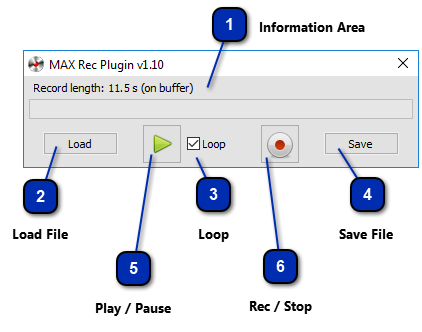
 Information Area Information about the commands sequence such as: if the sequence was loaded from a file, or it is just lies in the memory buffer. Its length in seconds. The progress bar that represents the all the sequence of commands and how much it was reproduced.
|
 Load File Open a dialog box to load a sequence of commands of a file into the memory buffer.
|
 Loop Automatically repeats the playback when it reaches the end of the buffer.
|
 Save File Open a dialog box to save into a file the sequence of commands in the memory buffer.
|
 Play / Pause Play and pause the commands sequence loaded on the memory buffer.
|
 Rec / Stop Start recording the sequence of commands in the memory buffer. This button can also stop the recording or stop the playing, depending on the action is being conducted.
|
|