This is a handy little GamePack for the downloadable Xbox One Game - Sixty Second Shooter Prime and will enable you to destroy your friends' best scores and own the leaderboard!
This is a pack I put together to not only make this great little game less manic but to make it accessible to our disabled customers.
The main feature for this pack is the slow motion Mod. It makes the later levels in the game so much less stressful, and therefore more enjoyable in my book, by slowing the game down and giving you more time to react.
I have also added the option to be able to play with one hand. With this Mod, the left and right sticks become one. Either one will operate the other. The Left Trigger will also operate the Right Trigger. This makes the game playable for someone who has difficulties when using two analog sticks at the same time.
I hope you enjoy it,
KittyDawn
A very special thanks to KittyDawn.
Instructions for Sixty Second Shooter Prime GamePackCompatible CronusMAX PLUS Firmware: 1.24+
Compatible Controllers: Dualshock 4, Dualshock 3, Xbox One, Xbox 360, Wii U Pro Compatible Systems: Xbox One
IMPORTANT
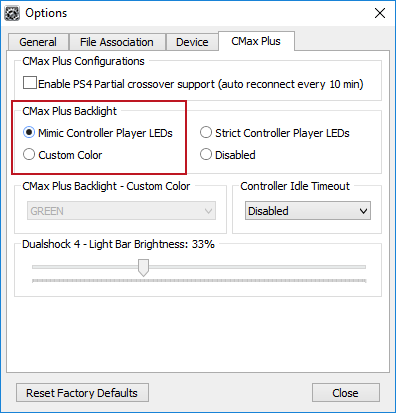
If you have a CronusMAX PLUS, make sure you goto Tools > Options > CMax Plus and enable "Mimic Controller Player LEDs" in the CMax Plus Backlight area if you want the CronusMAX PLUS Backlight LED features to work. Also, for more information on the benefits of using a USB Hub with your CronusMAX PLUS Click Here
GamePack Operation
Quick Disable/Re-Enable GamePack:
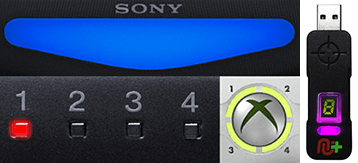
Player LED 1: Controller in regular mode, the GamePack is Disabled (Blue on DS4 / CronusMAX PLUS Backlight LED).
Player LED 4: The GamePack is Enabled (Pink on DS4 / CronusMAX PLUS Backlight LED).
GamePack Configuration
GCI (GamePack Configuration Interface) Operation:
All GamePacks have Mods that can be tuned and customized to your own preference. This is what makes the CronusMAX so powerful and extremely popular with the gaming community. The settings are usually made using the controllers built in GamePack Menu Mode, as explained below. However, there is a much easier and quicker method via the new GCI (GamePack Configuration Interface).
NOTE
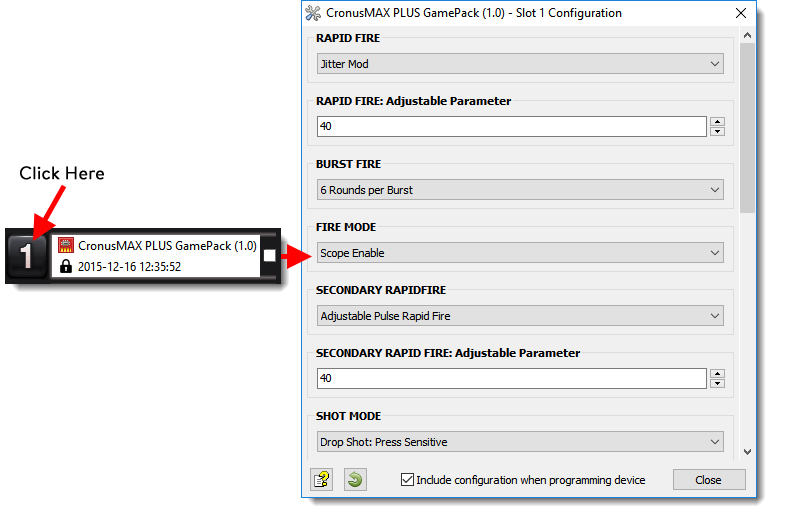
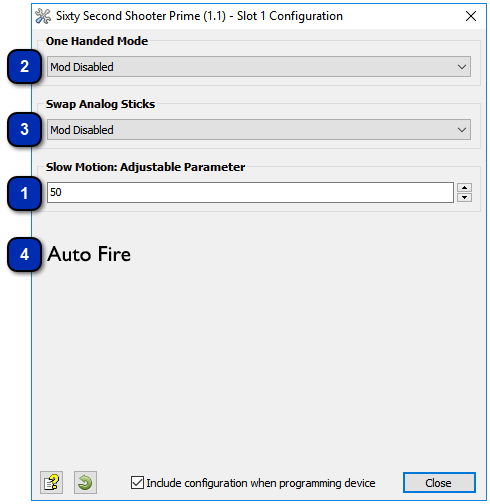
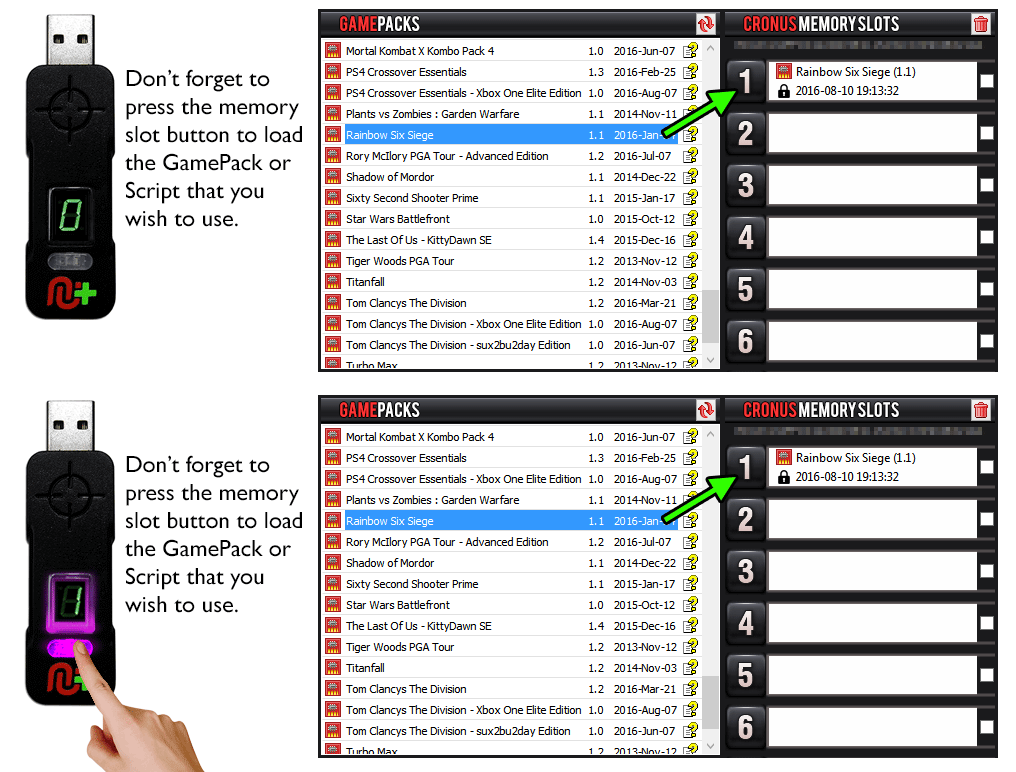
Pre-configure your GamePack settings using the GamePack Configuration Interface (GCI) in the Cronus PRO software. The GCI opens automatically when you load a GamePack to a memory slot, or you can simply click on the memory slot number to the left of the loaded GamePack to open the GCI. As soon as you select your preferred settings, close the GCI and click the PROGRAM DEVICE button. To select the GamePack you wish to use on your console, press the Memory Slot button on the CronusMAX PLUS so that it highlights the corresponding number on the LED (so if you have a GamePack loaded to Memory Slot 1, the LED on the CronusMAX PLUS should display the number 1).
How to Enter GamePack Menu Mode:
Note: The Menu is navigated via the CronusMAX PLUS LED System and also the controller's Player Number LED's if available. It is not an on-screen menu. Click Here for an instructional video.
Hold SELECT+START for 2 seconds to enter menu mode.
Hold SHARE+OPTIONS for 2 seconds to enter menu mode*
Hold BACK+START for 2 seconds to enter menu mode.
Hold VIEW+MENU for 2 seconds to enter menu mode.
IMPORTANT
Always keep the SELECT / SHARE / BACK / VIEW button pressed while in Menu Mode. To exit Menu mode, release the SELECT / SHARE / BACK / VIEW button.
Player LED 4 will blink the number of the current Class (DS4 / CronusMAX PLUS Backlight LED will flash Pink).
Player LED 3 will blink the number of the active Mod for the current Class (DS4 / CronusMAX PLUS Backlight LED will flash Green).
Note: If the Player LED 3 is not blinking, it means either no Mod is loaded/disabled or the default setting is selected for the current Class. See below for instructions how to navigate between Classes and Mod's.
To Navigate Between Classes:
Goes Up
Goes Down
To Navigate Between Mods Within the Current Class:
This Mod pauses/unpauses the game very quickly to give you that extra bit of time to react. Enable/Disable Shortcut: Quick Press Select/Back/View/Share + X/SQUARE.
HOW TO ADJUST THE SLOW MOTION SPEED
You can adjust Rapid Fire speed and test your settings within the game. (In Menu Mode: LB/L1 Reduce Slow Motion Rate - RB/R1 Increase Slow Motion Rate - RT/R2 Test).
This Mod enables users who have difficulty using both sticks simultaneously. When either stick is moved it will move the adjacent stick in the same direction.
This Mod will automatically rotate the stick that shoots in a clockwise circle when the stick is at rest. If you move the stick to manually shoot in any direction, it will temporarily be disabled and will resume when the stick is moved back to its rest position thus enabling you to still direct your shots while have the added benefit of constantly shooting.