Automatic PS4 Crossover |
 |
 |
 |
 |
 |
|
|
|
|
 |
 |
|
|
|
|
 |
 |
|
|
 |
 |
|
Press Select + Right Analog Stick (R3) together.
|
|
|
|
 |
|
Press Back + Right Analog Stick (RS) together.
|
|
|
|
 |
|
Press View + Right Analog Stick (RS) together.
|
GamePack Operation |
|
|
|
 |
|
 |
|
|
|
|
|
|
 |
|
|
|
|
 |
|
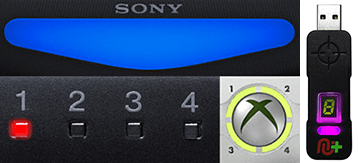 |
Player LED 1: Controller in regular mode, the GamePack is Disabled (Blue on DS4 / CronusMAX PLUS Backlight LED).
Player LED 4: The GamePack is Enabled (Pink on DS4 / CronusMAX PLUS Backlight LED).
|
GamePack Configuration |
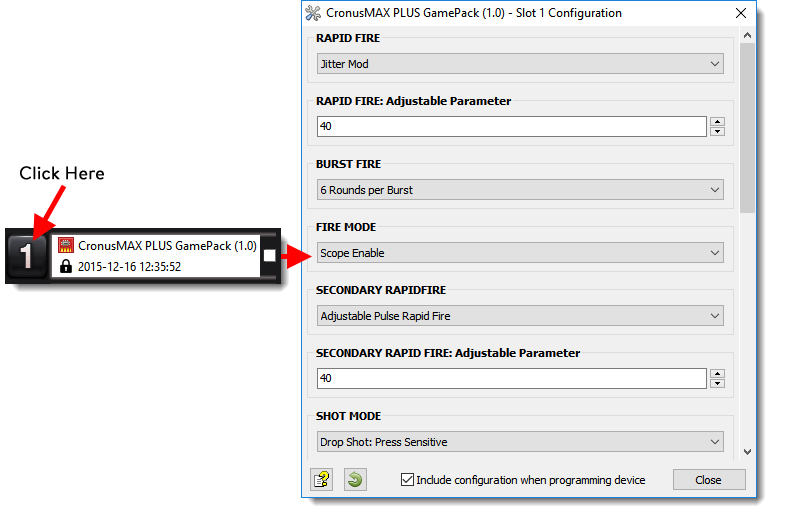
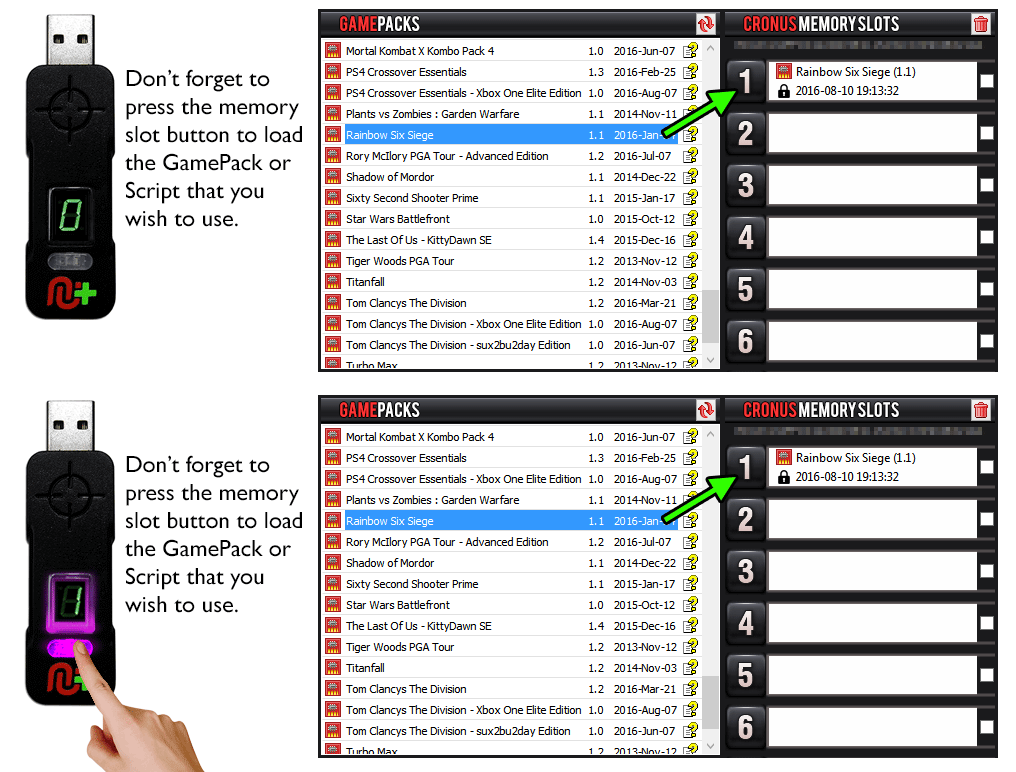
Pre-configure your GamePack settings using the GamePack Configuration Interface (GCI) in the Cronus PRO software. The GCI opens automatically when you load a GamePack to a memory slot, or you can simply click on the memory slot number to the left of the loaded GamePack to open the GCI. As soon as you select your preferred settings, close the GCI and click the PROGRAM DEVICE button. To select the GamePack you wish to use on your console, press the Memory Slot button on the CronusMAX PLUS so that it highlights the corresponding number on the LED (so if you have a GamePack loaded to Memory Slot 1, the LED on the CronusMAX PLUS should display the number 1).
|
|
|
 |
|
Hold SELECT+START for 2 seconds to enter menu mode.
|
|
|
|
 |
|
Hold SHARE+OPTIONS for 2 seconds to enter menu mode*
|
|
|
|
 |
|
Hold BACK+START for 2 seconds to enter menu mode.
|
|
|
|
 |
|
Hold VIEW+MENU for 2 seconds to enter menu mode.
|
|
|
Player LED 4 will blink the number of the current Class (DS4 / CronusMAX PLUS Backlight LED will flash Pink).
Player LED 3 will blink the number of the active Mod for the current Class (DS4 / CronusMAX PLUS Backlight LED will flash Green).
Note: If the Player LED 3 is not blinking, it means either no Mod is loaded/disabled or the default setting is selected for the current Class. See below for instructions how to navigate between Classes and Mod's.
|
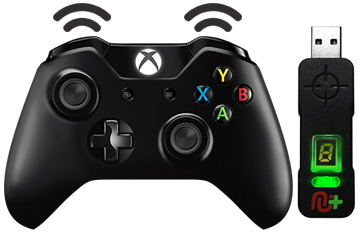 |
If you have an Xbox One Controller, the Right Trigger will rumble the number of the current Class (CronusMAX PLUS Backlight LED will flash Pink).
If you have an Xbox One Controller, the Left Trigger will rumble the number of active Mod for the current Class (CronusMAX PLUS Backlight LED will flash Green).
|
  |
Goes Up
|
|
Goes Down
|
  |
Goes Up
|
  |
Goes Down
|
GamePack Classes and Mods |
 |
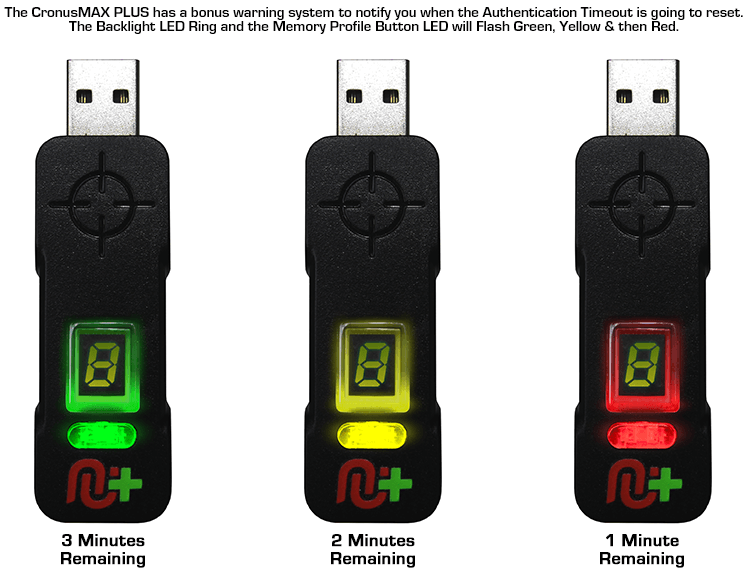
PlayStation 4 Partial Crossover Authentication Timeout Notification
|
 |
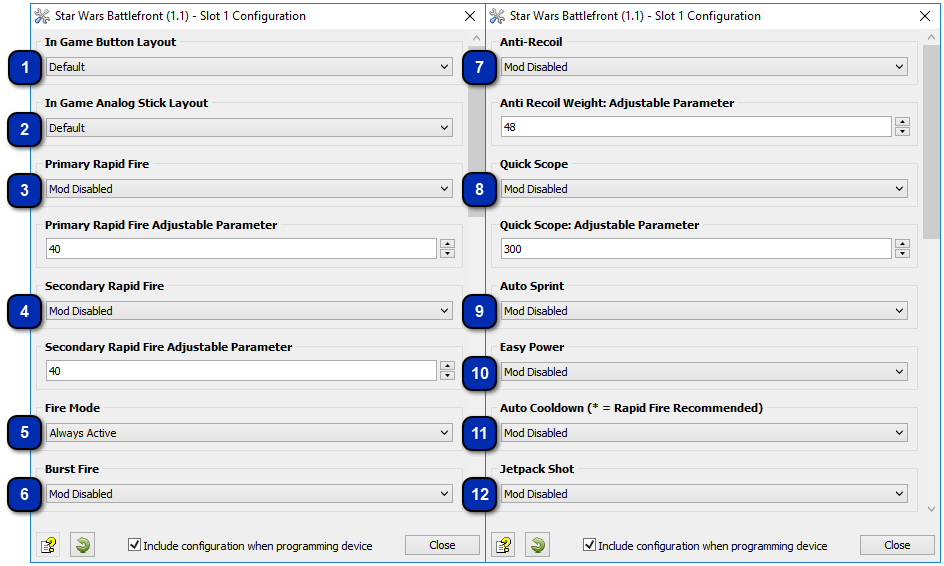
Tell the GamePack your in game settings for the Analog Stick. NOTE: Make sure this is set to the same layout that you are using in-game so that all the Mods are mapped correctly.
Thanks to KittyDawn for improving this great MOD. Simply tap the jump button (A or X) for less than 200ms to activate!
| |||||||||
Most weapons in Battlefront allow you to just hold the trigger and shoot the living hell out of anything in front of you. The problem is the weapons overheat really quickly so this Rapid Fire Mod will allow you to fine-tune the rate of fire, not just to go faster but also to slow it down, allowing for increased accuracy and longer firing periods.
You can adjust Primary Rapid Fire speed and test your settings within the game. (In Menu Mode: LB/L1 Reduce Value Increases Rate of Fire - RB/R1 Increase Value Reduces Rate of Fire - RT/R2 Test).
| ||||||||||||||||||||||||
If Secondary Rapid Fire is enabled it will take place when the regular Rapid Fire is not actuating. For example if your regular Rapid Fire is only active when scoping then the Secondary Rapid Fire will be activated when you are not using scope. This behavior can be very handy to set a precise rate of fire while aiming and a more aggressive rate of fire while hip firing.
You can adjust Secondary Rapid Fire speed and test your settings within the game. (In Menu Mode: LB/L1 Reduce Value Increases Rate of Fire - RB/R1 Increase Value Reduces Rate of Fire - RT/R2 Test).
| ||||||||||||||||||||||||
Fire mode determines an assist action to be used together with Rapid Fire and/or Burst Fire. These are normally applied to the triggers.
| ||||||||||||||||||
Burst firing is designed to turn semi automatic and automatic weapons into burst firing weapons. When this feature is enabled, your weapon will fire in bursts similar to the DH-17 and can be used with 1, 2, 3, 4, 5, or 6 round bursts. Burst firing can help reduce recoil and conserve ammunition and/or help prolong the length of time you can use a weapon so that it doesn't overheat as fast.
The Burst Fire Mod can be used by itself (With the Rapid Fire Mod disabled) or can be used as a modifier for the Rapid Fire Mod. That is, with Burst Fire and Rapid Fire enabled together, you will get a repeating burst of shots essentially giving you automatic Burst Fire. The delay between the bursts can be set with the Rapid Fire adjustable parameter allowing you to select how many rounds are fired per burst and the amount of time between bursts for a truly customizable experience.
| |||||||||||||||||||
This Mod compensates for vertical recoil while firing a weapon by automatically moving the control stick in the opposite direction of the one your gun is moving while firing. The adjustable parameter sets how much the compensation should be.
Remember, there isn't a one-size-fits-all setup for Anti-Recoil sensitivity due to different weapons having different perks and attachments affecting weight distribution. We suggest you try different adjustable values with each weapon and set to whatever you feel works best for you. We would appreciate if you share these values with the CronusMAX Support Community to help others :)
You can adjust Anti-Recoil and test your settings within the game. (In Menu Mode: LB/L1 Decrease Weight - RB/R1 Increase Weight - RT/R2 Test).
If your weapon is moving UP when you fire, you need a LARGER number in the adjustable parameter. If your weapon is moving DOWN when you fire, you need a SMALLER number in the adjustable parameter.
| |||||||||||||||||||||||||||||||||
Quick Scope is widely used in this game. The idea behind quick scope is to use a sniper rifle, scope IN and fire the shot as the gun scopes in. Perfecting the aiming and timing will allow you to become a one-man commando with your sniper rifle.
| ||||||||||||||||||
If you are tired of constantly pressing the left analog stick to make your character sprint, Auto Sprint is just what you have been looking for. NOTE: Auto Sprint Mod CAN be used with Quick Scope simultaneously.
| |||||||||||||||
If this Mod is enabled, simply press left on the D-Pad and the CronusMAX PLUS will press the two buttons to activate your super power.
| ||||||||||||
When a blaster overheats in Battlefront, you have the option of pressing X/Square at a specific time to instantly cooldown said blaster, this Mod automates this task for you. Simply press and hold the trigger and this Mod will press the cooldown button for you at the required time. NOTE: This Mod requires the in-game option 'gamepad vibration' enabled to operate correctly.
| ||||||||||||||||||||||||||||||||||||||
Combining Mod Classes |
Quick Reference: Classes and Mods |
|
01: IN GAME BUTTON LAYOUT
|
02: IN GAME ANALOG STICK LAYOUT
|
03: PRIMARY RAPID FIRE
|
|
00: Default
01: Alternative
02: Lefty
03: Lefty Alternative
|
00: Default
01: Southpaw
|
00: Mod Disabled
01: Optimized Rapid Fire
02: Adjustable Rapid Fire (Adjustable)
03: Pulse Rapid Fire (Adjustable)
|
|
04: SECONDARY RAPID FIRE
|
05: FIRE MODE
|
06: BURST FIRE
|
|
00: Mod Disabled
01: Optimized Rapid Fire
02: Adjustable Rapid Fire (Adjustable)
03: Pulse Rapid Fire (Adjustable)
|
00: Mod Disabled
01: Scope Disable
02: Scope Enable
03: Press Sensitive
|
00: Mod Disabled
01: 1 Round per Burst
02: 2 Rounds per Burst
03: 3 Rounds per Burst
04: 4 Rounds per Burst
05: 5 Rounds per Burst
06: 6 Rounds per Burst
|
|
07: ANTI-RECOIL
|
08: QUICK SCOPE
|
09: AUTO SPRINT
|
|
00: Mod Disabled
01: Anti-Recoil
02: Anti-Recoil - Scope Enable
03: Anti-Recoil - Scope Disable
04: Inverted-Y Anti-Recoil
05: Inverted-Y Anti-Recoil - Scope Enable
06: Inverted-Y Anti-Recoil - Scope Disable
|
00: Mod Disabled
01: Quick Scope: TAP
02: Quick Scope: Press Sensitive
03: Quick Scope: Fully Auto
All Quick Scope Modes Are Adjustable.
|
00: Mod Disabled
01: Fully Auto
02: Press Sensitive
|
|
10: EASY POWER
|
11: AUTO COOLDOWN
|
12: JETPACK SHOT
|
|
00: Mod Disabled
01: Mod Enabled
|
00: Mod Disabled
01: DLT-19 / DH-17 / E-11 / EE-3* / RT-97C / EE-4*
02: A280C / RELBY-V10* / DT-12*
03: DL-44* / DL-18* / X-8 NIGHT SNIPER*
04: T-21 / T-21B*
05: CA-87*
06: SE-14C*
07: DLT-19X*
NOTE: Blasters denoted with * are single shot/burst weapons and it is highly recommend that this Mod be used in conjunction with Rapid Fire for it to be effective with those blasters.
|
00: Mod Disabled
01: Jetpack Button (LB/L1)
02: Jetpack Button (RB/R1)
|