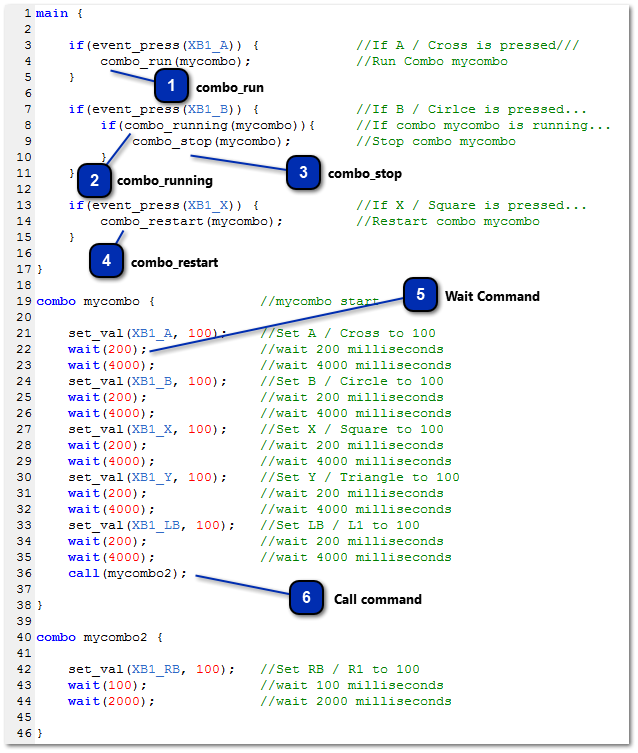
A combo (short for combination) is a combination of
preprogrammed instructions which are executed in sequence. Just like the main section, commands within a combo are performed in the order
they are written. You can run any code you can run in the main section within a combo such as calling functions or setting variables,
although this is generally unnecessary and usually results in nothing more than a waste of stack memory and
bytecode space. A combo is ideal suited to setting
the output of a button for a specific length of time which is done using the wait command, a command that is unique to combos and
cannot be used elsewhere.
Just as with variables, a combos name
can start with either an underscore ( _ ) or a letter and can be followed by any combination of letters,
digits or underscores.
combo_run
combo_run does precisely what the name suggests and runs a combo.
However, unlike the combo_restart command, it has no effect if the
combo is currently running. It will only start a combo is it is not already running.
combo_running is a function which can be used in your code to
check is a combo is running is not.
If the combo named in its parameter is running, then it will return TRUE. If not, it will return FALSE.
Syntax
combo_running ( <Combo Name> );
Parameters
<Combo Name> : The name assigned to a combo.
Returns
TRUE if the combo is running, FALSE if it is not
combo_running is particularly useful if you only want certain
lines of code executed when the combo has finished. For example, if you want to
run a combo 5 times from a single
button press, with a combination of combo_running and a
variable you can do so as shown in the example below;
int run_combo = 0;
main {
if(event_press(19)) { //If A / Cross is pressed...
run_combo = 5; //Variable 'run_combo' equals 5
}
if(run_combo && !combo_running(mycombo)) { //If 'run_combo' has a value and mycombo is not running...
run_combo = run_combo - 1; //'run_combo' equals 'run_combo' minus 1
combo_restart(mycombo); //restart mycombo
}
}
combo mycombo {
set_val(3, 100); //set RB / R1 to 100
wait(200); //wait 200 milliseconds
wait(200); //wait 200 milliseconds
}
Device
monitor output from the above code;
As you
can see, the output from the above code will press the RB / R1 button 5 times from a
single press of the A / Cross Button. As you can see, when using the combo_running function and a variable, it is possible to
produce multiple button presses with a small amount of code. You could change the
line 'run_combo = 5;' to any value above 0 (zero) and below 32767.
The combo would be executed however many times you stipulated.
As the
name suggests, combo_stop will stop a combo if it is currently
running. As with combo_run, it has no effect if the combo is not currently running.
Syntax
combo_stop ( <Combo Name> );
Parameters
<Combo Name> : The name assigned to a combo.
combo_stop is particularly useful when you only wish for your combo to run when a button
is held. To achieve this, you would use it in combination with an else statement as shown below;
As the
name suggests, combo_restart will restart a running combo.
If the combo stated within it's parameters is currently running, it will be restarted
from the beginning. If the combo is not currently running, it will be run.
The
wait command instructs the Virtual
Machine within the CronusMAX on how long the last set of commands should be executed
for. The length of time they instruct the VM to execute the commands for is
represented in milliseconds and can rand from 1ms to 32767ms (That's 1 millisecond to
just over 32 seconds).
The
commands executed during the wait
time are those placed between the current wait and the previous wait time, the current wait time and previous call command or the start of the
combo, whichever comes first.
As shown in the example below;
combo mycombo {
set_val(19, 100);//¯¯|
set_val(18, 100);// | These two buttons will be held
wait(1000); //←_| for 1000 milliseconds (1 second)
set_val(3, 100);//¯¯|
set_val(7, 100);// | These two buttons will be held
wait(1500); //←_| for 1500 milliseconds (1.5 seconds)
set_val(9, -100);//¯¯| This axis will be held
wait(2000); //←_| for 2000 milliseconds (2 seconds)
}
The
wait command can only be used within
a combo and must be at the first level of the combo block, it cannot be nested. The
example below shows correct and incorrect usage of the wait command;
main {
wait(100); //Incorrect - Will produce an error as this command is
//not permitted outside of a combo
}
combo mycombo {
if(get_console() == PIO_PS4) {
wait(200); //Incorrect - Although this wait command is within a combo,
//is is not permitted beyond the first level of the combo block
}
wait(400); //Correct - This wait command is at the first level of the
//combo block.
}
function myfunction() {
wait(300); //Incorrect - Will again produce an error as this command is
//not permitted outside of a combo
}
Syntax
wait ( <Time> );
Parameters
<Time> : The length of time the last commands should be executed for. Represented in milliseconds - range 10 ~ 4000
Like the
wait command, call is unique to combos and it is
not permitted outside of the first level of a combo.
When the
call command is used, the current
combo it is placed in is paused and
the combo within the call commands parameters is
executed. Once the called combo has finished, the combo the call command was executed in is
then resumed. For example;
combo _1st_combo {
set_val(XB1_B, 100);
wait(100);
wait(200);
call(_2nd_combo); //_1st_combo is paused until _2nd_combo is finished
set_val(XB1_Y, 100);
wait(100);
wait(200);
}
combo _2nd_combo {
set_val(XB1_RB, 100);
wait(100);
wait(200);
} //Once this combo has ended, the combo is was called from can resume
In the
above example, when _1st_combo is run, the sequence of commands sent to the console
would be;
B / Circle is pressed for 100 milliseconds
No buttons are pressed by the Virtual Machine for 200 milliseconds
RB / R1 is pressed for 100 milliseconds
No buttons are pressed by the Virtual Machine for 200 milliseconds
Y / Triangle is pressed for 100 milliseconds
No buttons are pressed by the Virtual Machine for 200 milliseconds
As you
can see, using the call command
injects a combo into a combo at a set point. This
is particularly useful when you have two combos which perform identical actions at a
point and wish to save space in your script.
Syntax
call ( <Combo Name> );
Parameters
<Combo Name> : The name of the combo to be called.