The Programmer
panel gives easy access to all GamePacks, GPC Scripts, Remapping Profiles, Visual Scripts and GPC Files. You
can select up to a total of 9 to be programmed directly to the CronusMAX PLUS memory slots using the Cronus
PRO software, making any combination of GamePacks (ready to use Mods for games), Remapper Profiles (created
with the MAX Mapper
plugin), Compiler Scripts (which are custom GPC scripts from the Compiler working panel or Online Library),
Visual Scripts (from the Visual Scripting
panel) or GPC script files (your saved scripts files).
To insert a
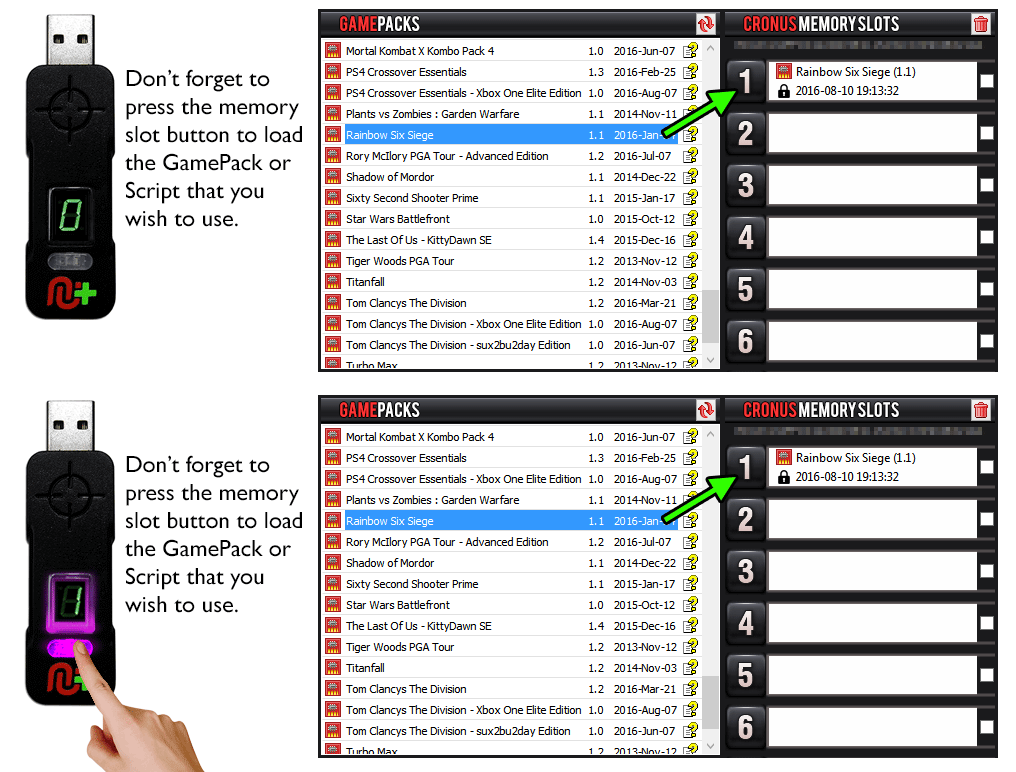
particular GamePack, GPC Script, Remapping Profile, Visual Script or GPC File into a memory slot, simply
drag-and-drop it from the corresponding list to one of the Memory Slots. Once in the memory slot, the code
remains there until you replace it or until you clean the slot. Please note that any update in the code's
original source will not automatically take effect in the memory slot, so if there are any new versions of
GamePack or other code that you may have used before, you will need to copy the file to the memory slot,
again by simple drag-and-drop.
Cronus PRO Programming Video Guide & Demonstration
The
very first item is the exported script from Visual Scripting, the remaining items from this
list are the scripts currently open in the Compiler panel. These scripts are developed by
you or downloaded from our Online Library.
Drag
and drop an item from this list to a memory slot. Cronus PRO will automatically
compile the GPC script to generate the code. Any compilation error will abort the
operation and a error message is shown.
All
available GamePacks are shown in this list. A GamePack is a set of exclusive Mods
developed by our team of scripting professionals and gaming experts to improve your
gaming experience. Usually a GamePack can be customized by enabling or disabling Mods or
adjusting parameters. The instruction of how to use a GamePack can be accessed by
double-clicking the help icon located next to the GamePacks name. There are also support
sections on our community forums for each GamePack where you
can request any extra features or report bugs. We are very active in this area as we
like to make our GamePacks the very best in the business.
Dragging and dropping an item from this list to a memory slot will automatically
download the GamePack from our server. The downloaded code is serial number locked and
can be only used by the CronusMAX PLUS with the same serial number.
NOTE - An Internet Connection is required to access GamePack features.
This
list shows all available profiles of MAX Mapper, and it allows you to you easily
remap all buttons, analog sticks and sensors to accurately customize the controller
layout of any game. MAX Mapper is an official plugin of CronusMAX
that comes pre-installed with Cronus PRO v1.10 and above.
This
control is a GPC file listing from your computer. The default starting directory is the
same as you last used to open or save a GPC file.
Dragging and dropping an item from this list to a CronusMAX PLUS memory slot will
automatically compile the GPC file. Any compilation error will abort the operation and
an error message is shown.
On
the left-side of the Programmer working panel you have the representation of all 9
memory slots of your CronusMAX PLUS. To insert a particular GamePack, GPC Script,
Remapping Profile or GPC File into a memory slot just drag-and-drop it from the
correspondent list to one of the 9 memory slots. Once in the memory slot, the code
remains there until you replace it or until you clean the slot.
On
each slot you can check the code type and name, the date and time when it was placed
into the slot and if it is serial number locked. Please note that any update in the
code's original source will not automatically take effect in the memory slot, so if
there are any new versions of GamePack or other code that you may have used before, you
will need to copy the file to the memory slot, again by simple drag-and-drop.
Click here for instructions on cleaning a memory
slot.
Your CronusMAX PLUS serial number is shown on the Programmer panel when
you have your CronusMAX connected to your computer. It's a unique code
assigned to identify your hardware. You can select and copy your serial
number from this text area. You can copy it to the clipboard of your
computer simply by double clicking on it. This is useful if you need to
email it to one of our technical support staff or if you need to check
if your serial number is registered on our server - you can check to see
if you have a valid CronusMAX PLUS Serial Number at this page: www.cronusmax.com/serial-number-lookup
GamePacks can have a wide range of settings for customization. The
settings are usually made using the controller, as explained in the
GamePack instructions. However, you can also pre-set all customizations
for a GamePack using the configuration interface, by clicking on the
slot number associated to the GamePack. Please visit the GamePack Configuration section for
more details about how to setting up a GamePack.
The changes made to the memory slots are not automatically updated to
your CronusMAX PLUS, even for the cleaning operation, you have to click
on the Program Device Slots button to start the updating, a wizard
window will open to guide you through the device programming process.
To remove any saved code from a memory slot simply click on the checkbox
next to the slot and then click on the red trashcan icon. You can check
more than one slot at the same time, the clean operation will remove the
code from all checked slots.